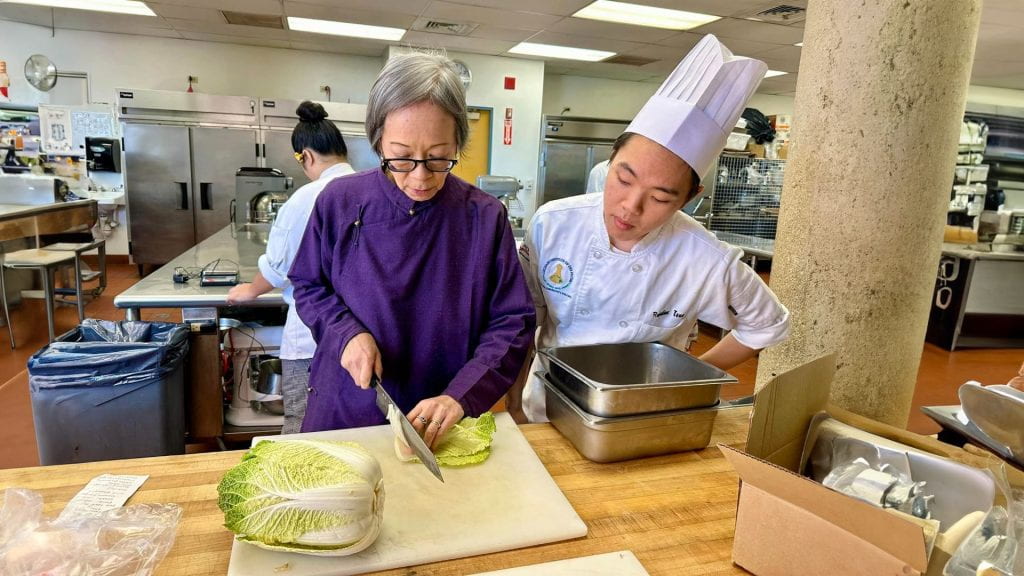
Grace Young and Leeward Culinary Student. (photo credit: Hawaii Culinary Education Foundation)
The Leeward Culinary program hosts a student assembly every semester in which students have the opportunity to meet the program’s Chefs/Instructors and hear announcements of upcoming volunteer events. In addition to the general housekeeping items, the program partners with Hayley Matson-Mathes of Hawaii Culinary Education Foundation to provide the students with an opportunity to learn from some of the best Chefs and culinary professionals in the industry. The visiting Chef provides a demonstration of their talents and insight into their experience in the industry, followed by a question and answer portion. The Visiting Chef series provides an invaluable service for our culinary student population who stands to gain insider knowledge of culinary techniques and industry trends. The Spring 2024 assembly hosted Grace Young, an award-winning cookbook author, culinary historian, and filmmaker. Grace shared her insight on her stir fry wok techniques. Student volunteers had the opportunity to stir fry alongside Grace during the demonstration.
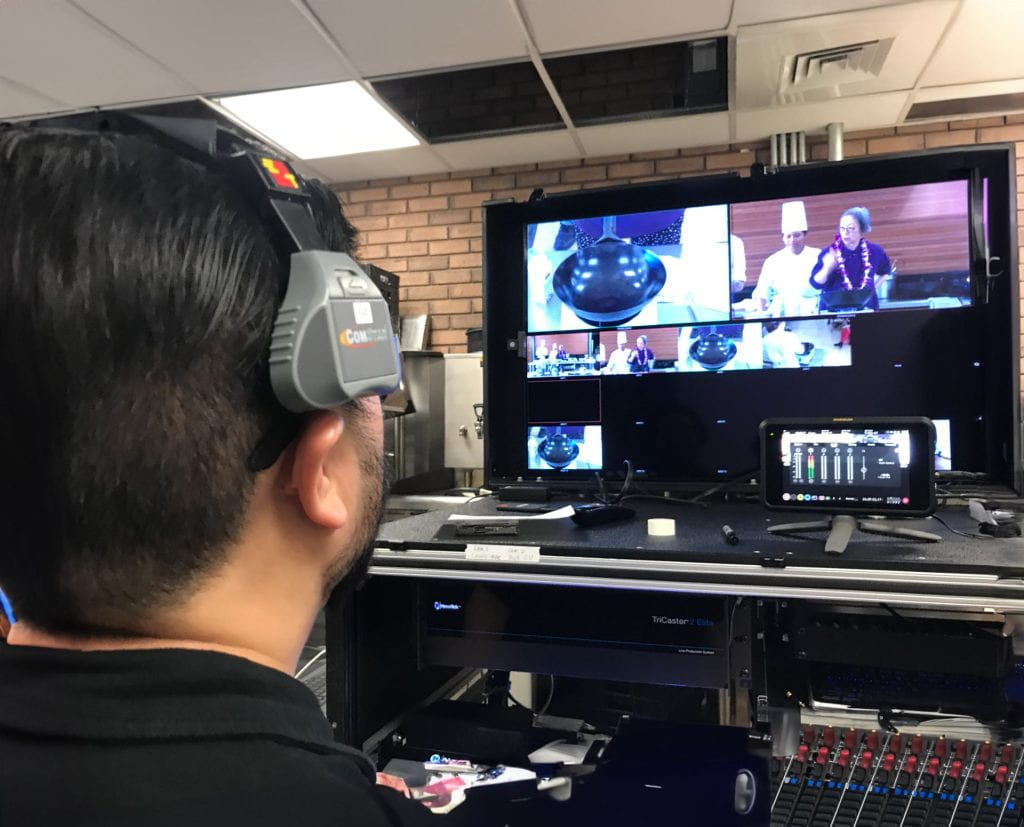
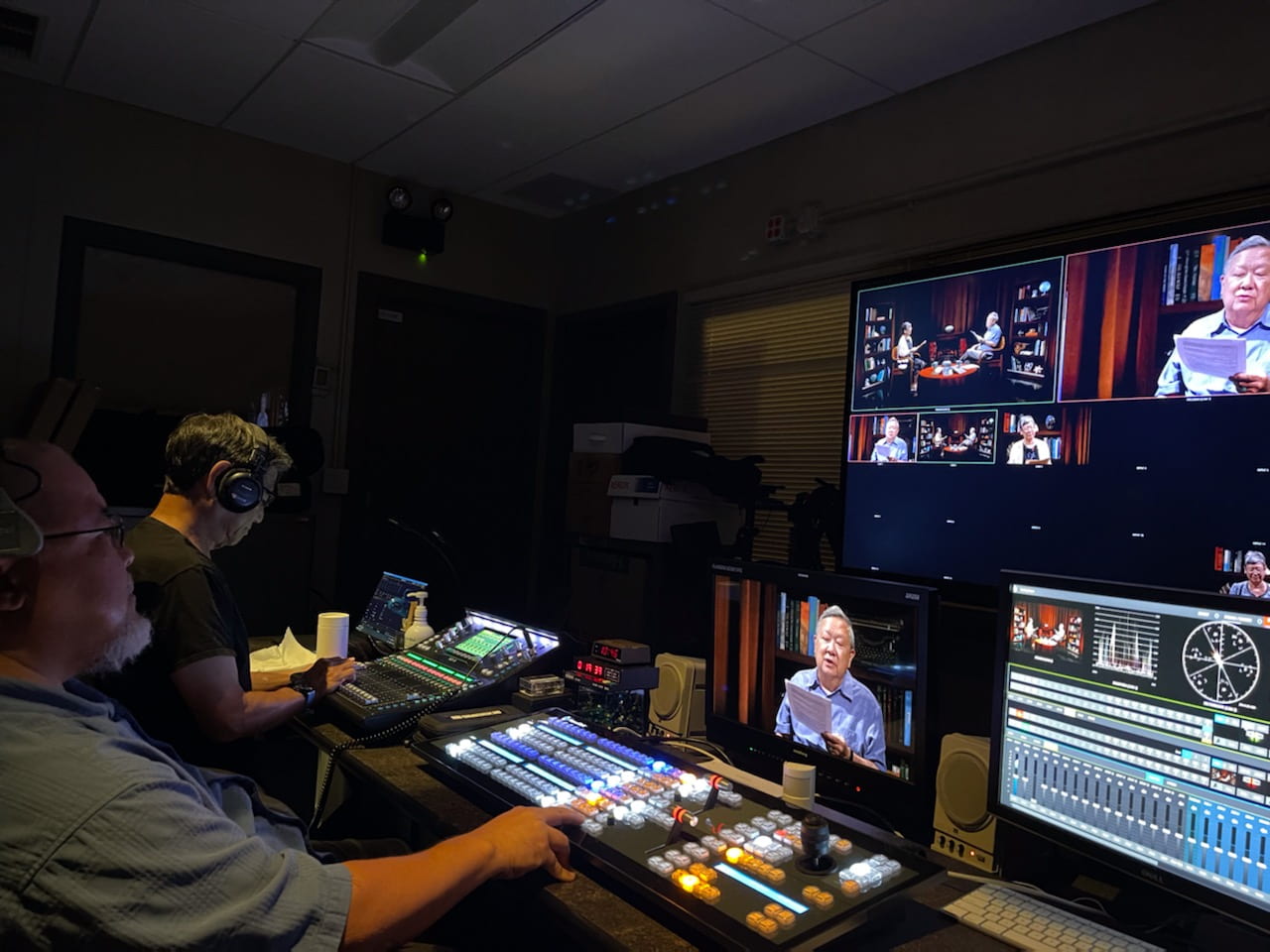
The EMC Video Production Unit provides services that enhance the live demonstration experience. The team documents the entire event with a multi-camera and audio recording setup. An overhead camera captures every aspect of the demonstration area that is displayed in real-time to a large screen monitor. The monitor also serves to show videos or presentations. The final product is an instructional video program that includes post-production editing, graphics, and closed-captioning services.
Jordan directing the Culinary Assembly
If your organization would like to inquire about capturing an event for instructional and promotional purposes or if you have an idea for instructional videos to supplement your courses, please feel free to fill out our Video Services Request Form.
H5P is a software ecosystem that provides instructors with 53 tools to create engaging learning activities for student learning. The web based activities are responsive and adjust to either desktop, laptop, mobile device, Safari, Chrome, Firefox. Take a look at the course samples created and shared in the UH H5P Interactive (Faculty) Gallery. H5P + Laulima is officially supported by the UH ITS Helpdesk, The learning activities are capable of being embedded in Laulima course sites and automatically registers student interaction scores in the Laulima Gradebook.
For the past few semesters the EMC has been participating with the UH System H5P work group to bring H5P to instructors. Many Leeward CC faculty have participated in the UHOIC H5P + Laulima program, currently on cohort three of faculty adopters with several alumni participating in the I Mua community support group. Over the summer the university announced that faculty can purchase H5P licenses directly from UH ITS Site License office (with departmental funds).
Be on the look out for upcoming EMC hosted H5P workshops this semester. To learn more about H5P please take a look at the recently completed Practical Guide to H5P.
The following is a guest blog post from Allision Beale.
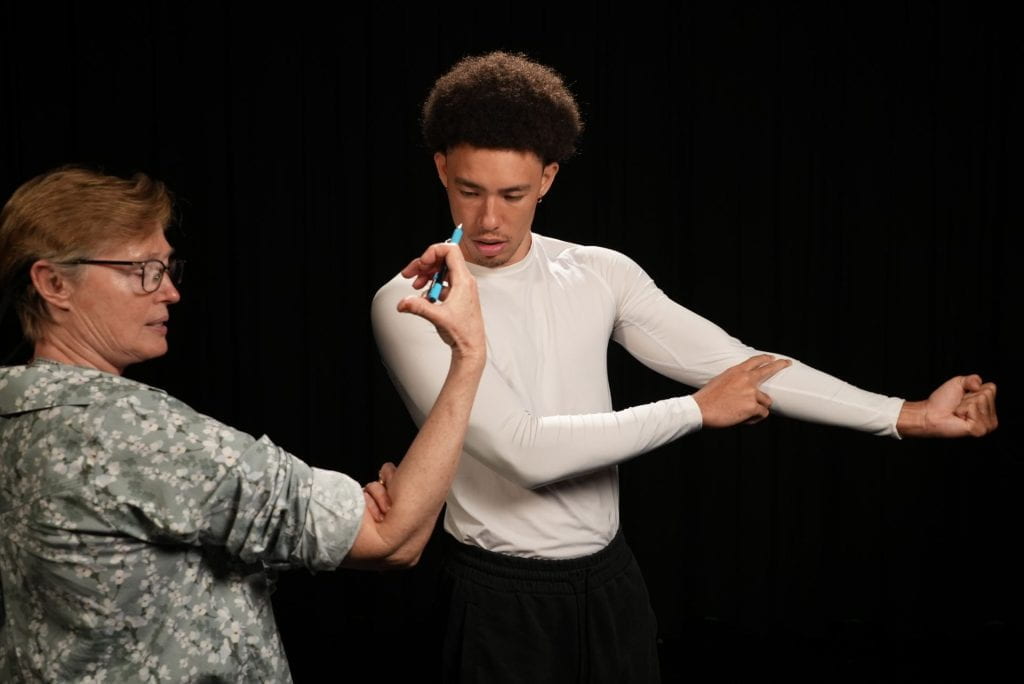
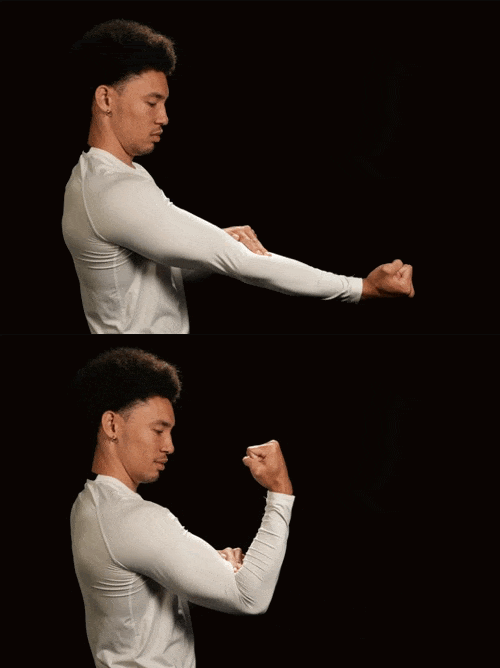
After the successful production of 19 OER demonstration and dissection anatomy videos for our A&P students in 2022 (check out thePHYL 141L playlist andPHYL 142L playlist of videos), Dr. I-Chia Shih and I began to tackle the production of functional anatomy videos. Our latest collaboration project encompassed producing approximately 40 short videos demonstrating the assessment of skeletal muscles covered in our PHYL 141L course. These videos are used in a functional skeletal muscle lab activity that mirrors a standard nursing school activity. The amazing results may be viewed in theFunctional Anatomy playlist.
Allison shows Theo how to feel for the biceps tendon in the cubital fossa
The EMC Video Production unit provided video support for this project. Production services included: lighting, photography, audio voice overs, and post production editing and graphic treatments. The team included: Camden Barruga and Theopholius (Theo) O’Neal, with Camden serving as photographer, sound, editing and remastering, while Theo turned into a phenomenal model alongside his regular duties assisting in the production process.
Theo flexes to feel for his biceps tendon in the cubital fossa
We look forward to continuing our collaboration with the EMC making additional videos to support lab activities in both PHYL 141L and 142L. In the near future, we hope to collaborate in the production of video lectures to support the new OER A&P textbook Dr. Shih and I are in the process of developing.
Note: For more information on how the EMC Video Production unit can serve your instructional video needs, please contact Camden Barruga at ext. 640, email camden@hawaii.edu, or simply fill out a video production service request form. You can view the EMC’s YouTube playlist on their website for a sampling of the types of videos they have produced.
The DE Course R&R: (Re)design and Review Pilot Program has completed its one-year term (2022-2023) of three cohorts and a fast-track group. This pilot program was intended to ensure and improve existing and newly becoming DE courses to meet Leeward’s DE Guidelines and accreditation requirements. During the program, DE instructors were guided through a course design process by the EMC’s Instructional Designers. After weeks of hard work, they created a high-quality DE course that they could be 100% confident is “Ready for Delivery” (“RFD”)—meaning, a course that aligns with our Leeward CC DE Guidelines and has passed a team course review.
We would like to acknowledge the following 21 completers who have created “RFD” DE courses and their commitment to quality DE courses at Leeward. What an accomplishment! 🎉
Fall 2022 R&R
Ann Berner (LA) – ENG 100
Anuschka Faucci (M&S) – ZOOL 200
Jessie Hoffman (M&S) – OCN 201L
Sharolyn Pastor (LA) – SP 151
Evelyn Wong (BUS) – ACC 132
Spring 2023 R&R
Donald Carreira-Ching (LA) – ENG 100
Chris Rho (BUS) – BUS 101
William Wright (M&S) – ICS 170
Spring 2023 Fast-Track
Eunice Brekke (SS) – SOC 251
Merissa Bunton (LA) – SP 151
Cara Chang (LA) – ENG 100
Anika Gearhart (SS) – PSY 212
Bruce Lindquist (SS) – GEO 101
Heather McCafferty (M&S) – AG 100
Marie McKenzie (SS) – GEO 101L
Janet Wang-Lee (M&S) – BIOL 100
Susan Wood (LA) – ENG 100
Summer 2023 R&R
Lilian Rebamonte-Smith (SS) – ED 330
Dayle Turner (LA) – ENG 100
Sheri Wang (BUS) – ACC 124
Igor Nikitin (M&S) – MATH 135
A big mahalo to our DE Leads over the semesters for their collaboration and partnership in the development of the program and for their coordination of the course review phase.
Kelsie Aguilera (SS)
Evelyn Wong (BUS)
Cara Chang (LA)
We will be taking a short break as we look to refine and improve the pilot program into a regularly offered summer program. Stay tuned!
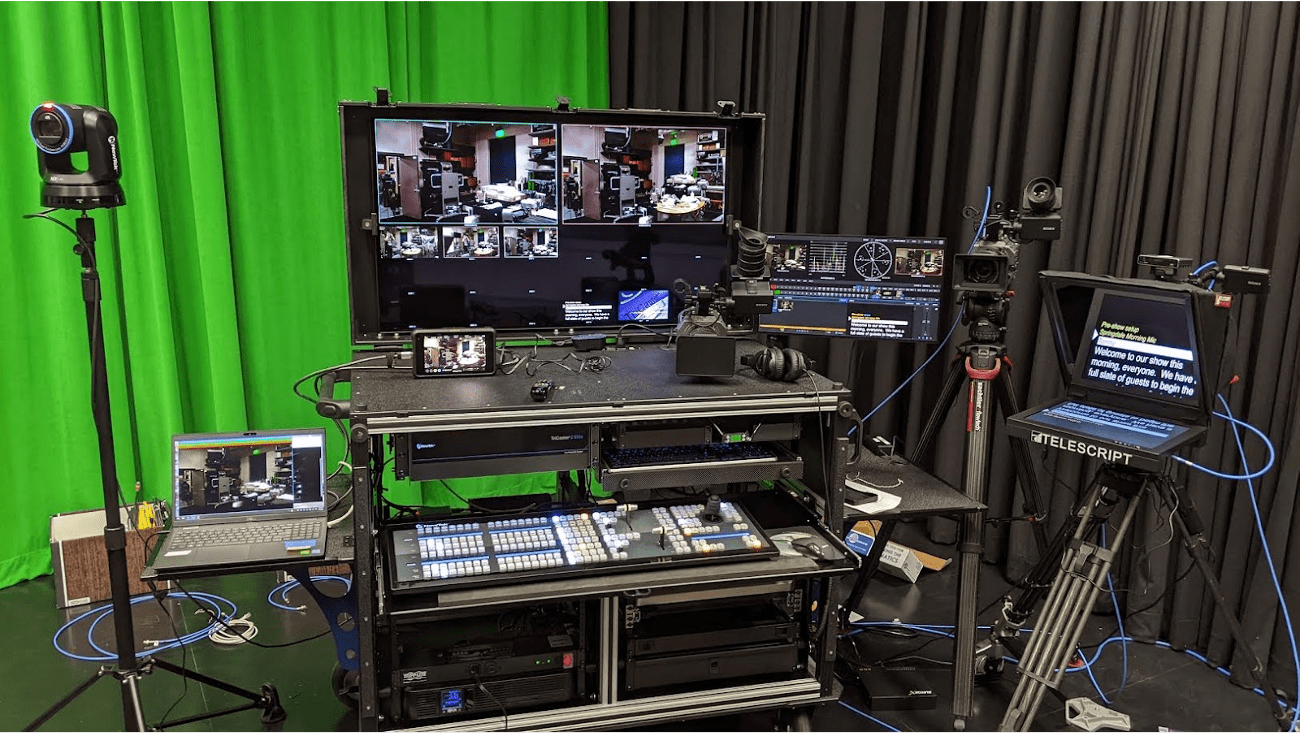
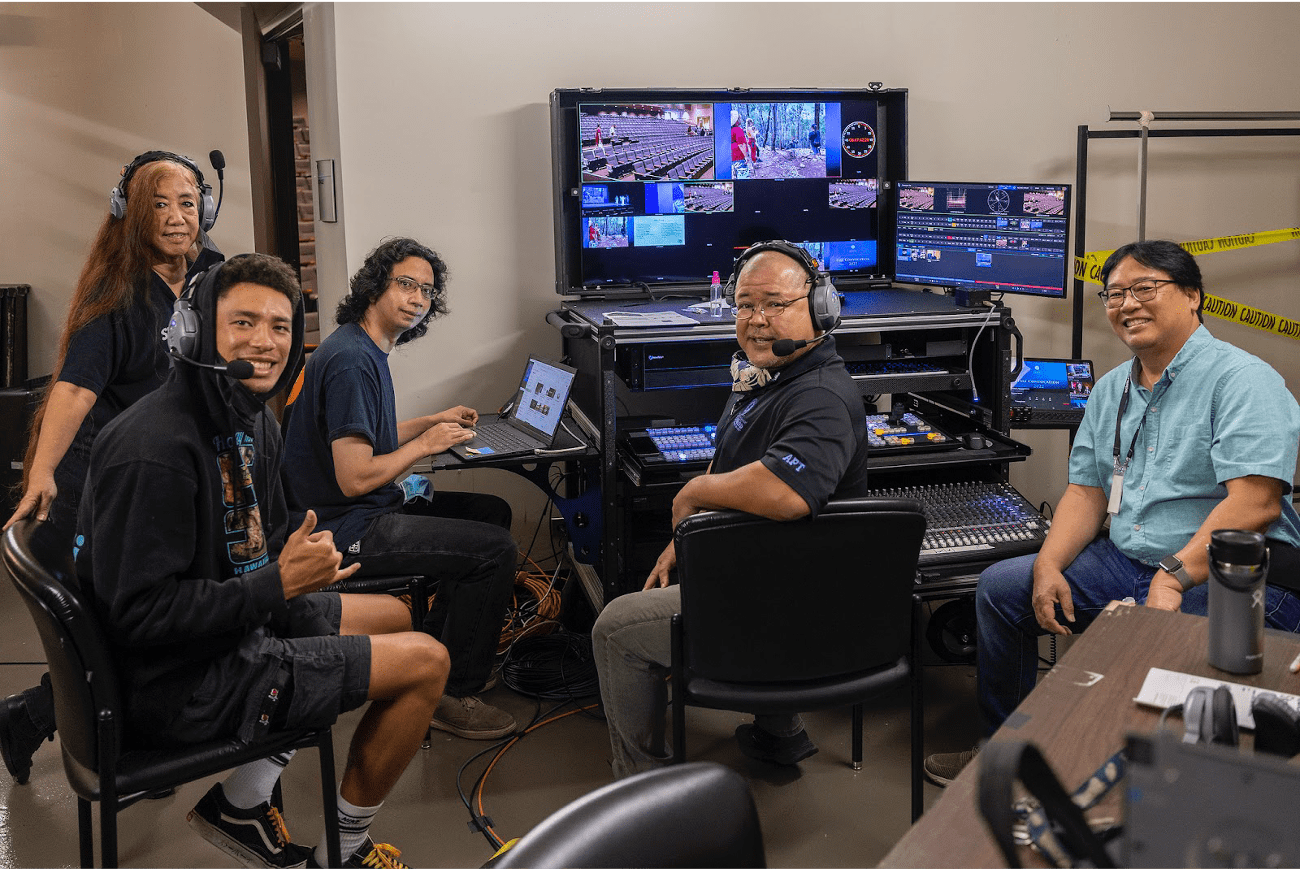
The Media Center Mobile Studio/Control Room (MCMS/CR) was created in response to the increasing video demand during the COVID-19 pandemic and the social distancing protocol. The MCMS/CR has been instrumental in providing various live-streaming and pre-recorded campus and instructional programming including but not limited to: Convocation, Graduation, Board of Regents Meetings, Culinary Assemblies, The Reading Room series, Professional Development programs, Community Outreach and Marketing initiatives.
After the pandemic, the MCMS/CR equipment upgrade has improved our studio setup while affording us the mobility of shooting on-location. Prior to the MCMS/CR equipment upgrade, in order to “take the show on the road,” the EMC staff had to disassemble and reassemble equipment from the Media Center Control Room and Studio to create a make-shift, mobile control room in order to provide a full-multi camera production on-location. The MCMS/CR eliminated the reconfiguration of equipment by consolidating them into a specifically designed mobile cart. It was a necessary step to providing a streamlined, flexible workflow to meet campus video production needs.
Designed with portability in mind, MCMS/CR allows our limited personnel to safely, effectively and quickly transport the main components of a professional control room to provide broadcast quality video production capability to remote locations on or off campus (e.g. Theatre, laboratory classrooms, and event halls).
Convocation: Production crew backstage of the theatre.
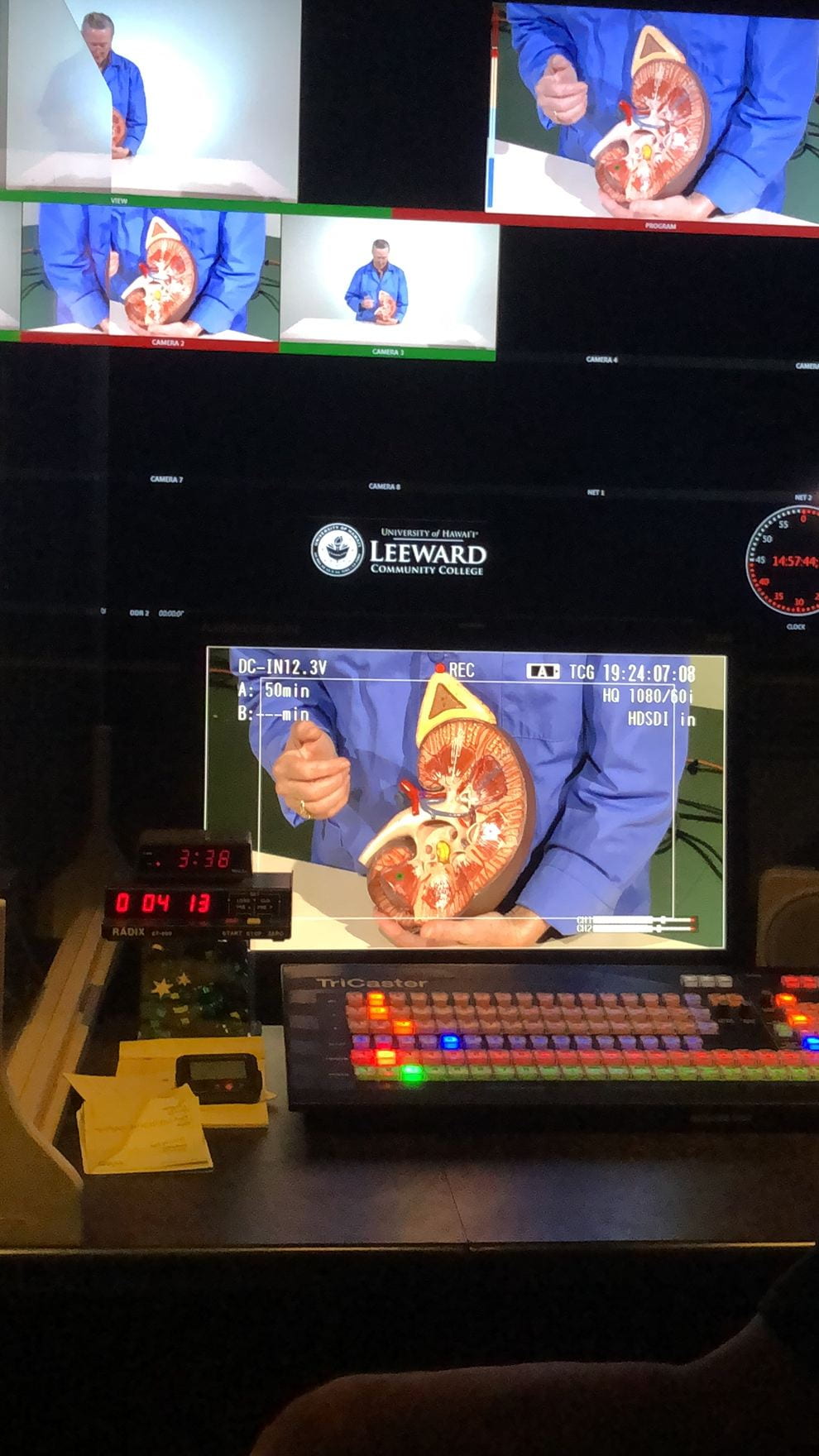
At the heart of the MCMS/CR is the Tricaster TC-2, video production platform. One of the stand out features of the TC-2 allows for seamless streaming service compatibility with platforms such as Zoom, Skype, MS Teams, etc. enhancing the participants’ experiences providing two-way communication from the Media Center Studio to participants joining remotely. Additionally the TC-2 allows for delivery to most popular streaming services, e.g. YouTube, Facebook and other social platforms. This built-in streaming feature was integral during the pandemic to provide information to the masses when in large in-person events were restricted. At its core, the TC-2 is a multi-source video switcher for cameras, computers, etc. In addition, it has the ability to store and playback multimedia assets such as video roll-ins, graphics and audio. Additional systems allow monitoring, handling additional tasks for teleprompting, audience and production asset management from the control room and studio floor.
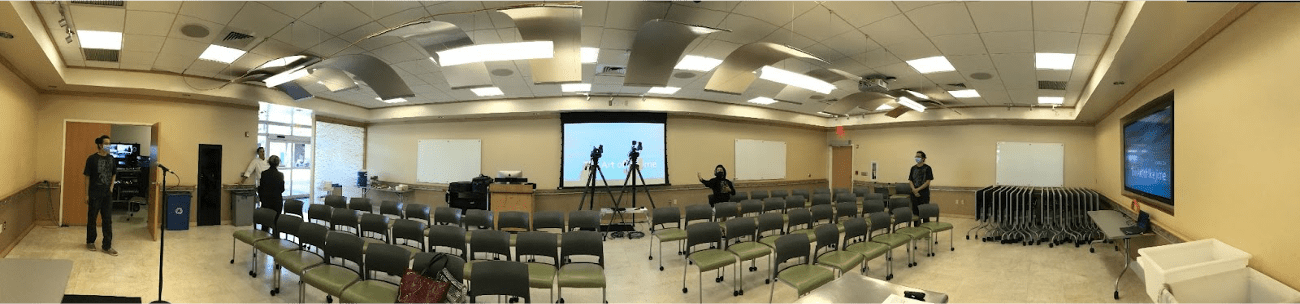
Culinary Assembly in The Ka’ala Room (GT 105).
While the MCMS/CR functions as a mobile solution, its primary function is for in-house production in concert with the EMCʻs studio floor and lighting system. While “docked” to the EMC control room console, the MCMS/CR continues all capabilities formerly present in previous studio set up while also extending its capabilities to include variable video resolutions, more audience interactivity, extended quality assurance and streamlined operations. In addition to its mobile capabilities, the studio/control room is available for instructors to create various media deliverables to enhance and compliment their in person and online courses.
The Reading Room: In-house EMC Control Room.
More information about the TC-2’s features and a few highlights:
Allows the audio operator the ability to control sound to studio for video playback
Live-streaming (Zoom web conferencing, YouTube, etc.) from studio and control room
Allows for talent on the studio floor to communicate and respond to web conference attendees (Zoom)
Ability to control studio lighting from the control room
Ability to prompt talent from the control room, off-air (with a teleprompter)
Ability to have cameras on-location and switch from the studio (remote studio)
Have an idea for videos that supplement course material or interested in a tour of our facility? Please contact Camden Barruga at extension #604 or email camden@hawaii.edu.
Gloria Niles, Director of Online Learning at UH ITS, presented an update about the LMS replacement during the UH IT All-Campus Workshop on July 28, 2023. Read on for a brief recap and access the full presentation recording and presentation slides.
Where We Were
We’ve been with Laulima (Sakai) for about 15 years. A main concern of continuing with Sakai is that it’s down about 1.5% of the market share. Developers have left and the most recent version we are on will likely be the last version of Sakai. Therefore, third-party systems neglect to integrate with Sakai and we won’t be getting updates which may also pose security vulnerabilities.
In Spring 2023, UH went through a LMS Review phase to help make a decision on if we should replace Laulima (Sakai). During the LMS review, three vendors/platforms (i.e. Anthology Blackboard Learn Ultra, D2L Brightspace, and Instructure Canvas) were reviewed by the UH community to see what is currently out there. Strengths and concerns of Laulima and the three platforms were summarized in the LMS Report. The report was submitted to the UH Officers in May 2023 with a recommendation to transition away from Laulima. The decision was made to replace Laulima.
Where We Are Now
UH is going out for a full RFP (request for proposals). Some of the features we are looking for include:
Modern functionality – mobile app, responsive design, robust tools for teaching and learning
Systemwide LMS – Sakai, RCUH, etc. Move everyone under one platform.
Content migration from Sakai
Vendor-university partnership evidence – responsive to customer feedback, professional development, training, and support
ʻŌlelo Hawaiʻi language pack
Integration with our other systems like Banner, PeopleSoft, etc.
Accessibility
Standard features such as: assessment of learning outcomes, dynamic learner engagement features, feedback and grading efficiencies, third-party app integration, and more.
Optional features that we could add-on/purchase: interactive multimedia content, digital badging capabilities, generative AI integration, OER, and more.
Where We Are Heading
Projected Timeline for 2023:
August: RFP out for bid
September: Proposals received and vetted
October: Proposal evaluation and scoring
November: Contract awarded
December: Announce new LMS
Tentative Implementation Strategy
Goal: Full migration to new LMS for all courses by Fall 2025.
Fall 2024: Cohort 1 migration
Spring 2025: Cohort 1 implementation and Cohort 2 migration
Summer 2025: Transition to Laulima archive. New LMS full implementation.
Did you know you can add captions to your Zoom recordings? In accordance with the UH Guidelines for Accessible Technology and Digital Media, courses and course content should be accessibility compliant. One way to ensure your videos like your Zoom recording videos are accessibility compliant is to include captioning on them.
Recently, Zoom has included transcriptions for recorded meetings that can be downloaded through the cloud service. The UH Zoom Cloud Service is managed by UH ITS, and allows faculty and staff to save their recorded meetings to the cloud for download.
In the first Zoom tutorial video we will show you step-by-step instructions to request access to the UH Zoom Cloud Service (if you haven’t already), how to change your Zoom settings to enable transcriptions (one-time only step), and how to download files from the cloud service.
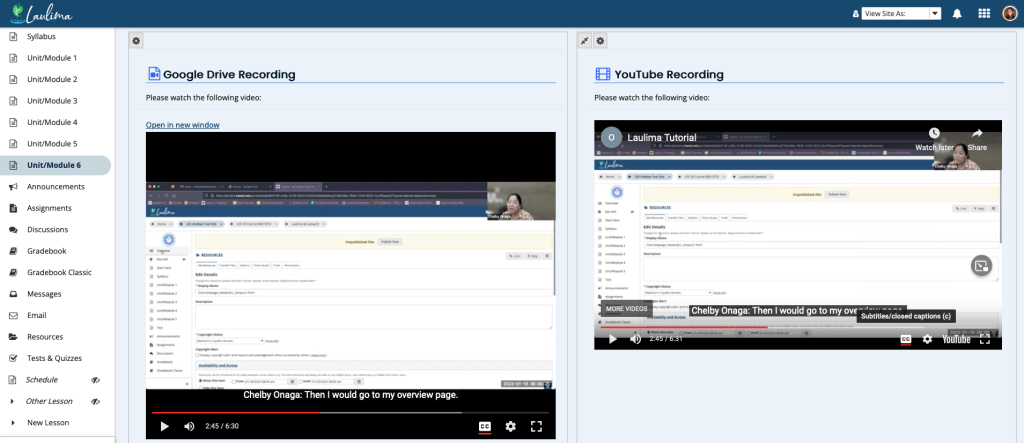
It is highly recommended to download the video recording and transcript files from the UH Zoom Cloud Service before uploading and embedding the video to Laulima. There are two options, you may upload your recording and captions to Google Drive. Or, you may upload your recording and captions to YouTube.
In the second Zoom tutorial video, we will show you how to upload the video file (.mp4) and transcript file (.vtt) to Google Drive. Then, we will show you to embed the Google Drive video into Laulima Lessons.
In the third Zoom tutorial video, we will show you how to upload the file (.mp4) and transcript file (.vtt) to YouTube. Then, we will show you how to embed the YouTube video into Laulima Lessons.
For those of you using a UH Laulima template, after the most recent Laulima update, you no longer need to update the overview.html page in Resources to update your Overview tool/page in your Laulima course site. There is a one-time step you’ll need to do to put that overview page content directly in the Overview tool which will then allow you to edit directly in the Overview tool using the text editor. You will continue to edit/update using the Overview tool’s text editor even when you import the Overview tool into your next semester’s Laulima site. Follow these instructions and/or watch this video tutorial (6:00) to show you how.
8/23/23 Update: You’ll also need to update any images you have on your Overview page because that image is private to that particular course site. Either upload the image to your course site’s Resources tool and re-insert it on your Overview page. Or, and recommended, upload it to your Home site Resources tool, change the settings to public, and in your course site, re-insert that image on your Overview page. Doing it the latter way will allow you to import to next semester’s site without having to update the image file.
During the 2022 winter break, ITS Laulima Support upgraded to v21. You may notice some interface changes as well as a few new features.
Quick Highlights
Some highlights in v21 include:
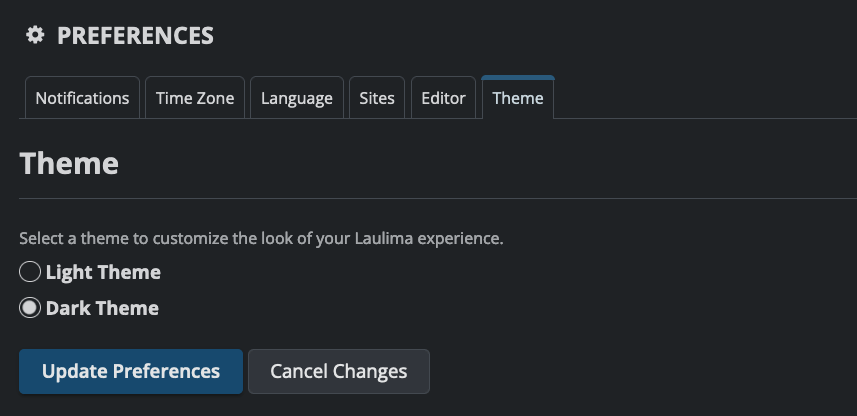
Dark Theme mode:
Dashboard (New Tool):
Add Widgets
Select a Layout
Assignments:
External Tool (LTI) – submit assignments that use outside publishing or vendor platforms that are integrated into Laulima such as IDAP, Cenage Tools, or H5P + Laulima
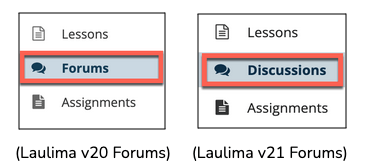
Forums (Renamed to “Discussions”):
Gradebook:
Message Students – directly message students from the Gradebook tool regarding a particular gradebook item.
Import/Export tab
Lessons:
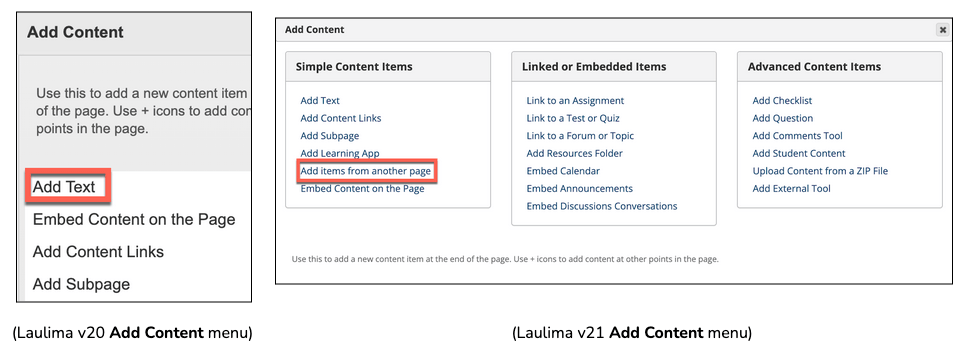
Add Content menu
Add Layout from Template
Reorder screen
Rubrics:
Search function
Weighted Criteria
More Information
For a complete list and information of all new features and changes in Laulima v21, please see the faculty resource document.
Additionally, there will be a Laulima v21 Upgrade and Tips for Instruction webinar hosted by the UH Instructional Design Professional Learning Community (PLC) this Friday, January 6th, from 10:00AM – 11:30AM. Please consider registering to attend.
The following is a guest blog post from I-Chia Shih, Assistant Professor of Physiology.
For students who are studying anatomy and physiology (A&P), they know that this subject has a reputation for being a highly intensive class. Imagine if you had to learn A&P during the pandemic when classes went online and everything was shut down! When the pandemic started to affect our lives three years ago, our ways of teaching and learning were forever changed. After a year of the pandemic, Allison Beale (Physiology Lecturer) and I noticed that A&P students were in desperate need of more resources to truly learn the structures and functions of the human body.
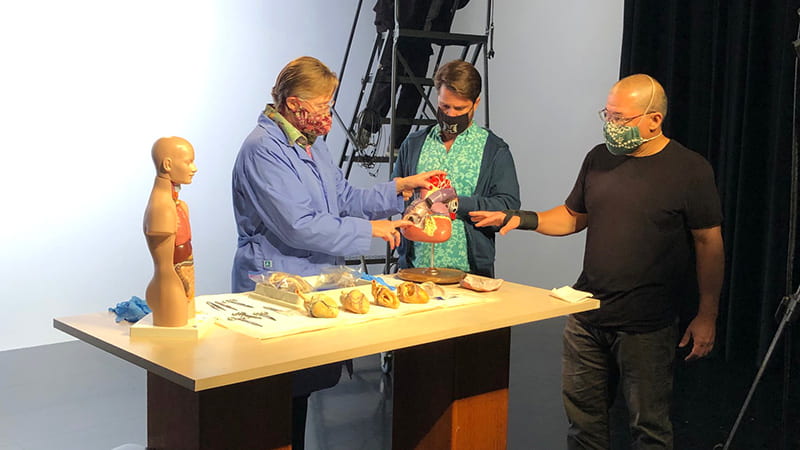
We saw an opportunity when the EMC asked if anyone needed help creating instructional videos. Allison and I proposed the development of high-quality OER anatomy videos for human anatomy and physiology. This idea later evolved towards developing videos for all anatomy and physiology students at Leeward CC and beyond, with the intent of providing support materials for an OER lab manual. To create these videos, Allison worked closely with Camden Barruga and his Video Production team from the Educational Media Center (EMC). The EMC staff, including student assistants Theo and Audrey, and Theater staff, helped to set up everything for a multi-camera production including set design, lighting, video and sound in the Media Center Studio. This teamwork, through numerous recording/editing sessions, generated 19 OER demonstration anatomy videos for our A&P students. Check out the PHYL_141L playlist and PHYL_142L playlist of videos. Allison’s goal was to provide students with the necessary resources so that they will be able to watch and learn about the bones, muscles, heart, and other organ systems. In addition, she covered the dissected structures of the sheep brain, sheep heart and cow eye to offer students a closer look at the real structures as if they were dissecting the specimens themselves. These videos are a product of the tremendous amount of effort and passion we put in to help our students learn and reach their professional dreams.
*****
Have an idea for an instructional video or series of videos? Would you like more information on services the EMC Video unit provides? Perhaps a tour of the studio to get the creative juices flowing? Please feel free to contact Camden Barruga at ext. 604 or camden@hawaii.edu. We look forward to collaborating with you to take your project from conception to completion.