Category: Ed Tech
Want Engaging Online Content?

H5P is a software ecosystem that provides instructors with 53 tools to create engaging learning activities for student learning. The web based activities are responsive and adjust to either desktop, laptop, mobile device, Safari, Chrome, Firefox. Take a look at the course samples created and shared in the UH H5P Interactive (Faculty) Gallery. H5P + Laulima is officially supported by the UH ITS Helpdesk, The learning activities are capable of being embedded in Laulima course sites and automatically registers student interaction scores in the Laulima Gradebook.
For the past few semesters the EMC has been participating with the UH System H5P work group to bring H5P to instructors. Many Leeward CC faculty have participated in the UHOIC H5P + Laulima program, currently on cohort three of faculty adopters with several alumni participating in the I Mua community support group. Over the summer the university announced that faculty can purchase H5P licenses directly from UH ITS Site License office (with departmental funds).
Be on the look out for upcoming EMC hosted H5P workshops this semester. To learn more about H5P please take a look at the recently completed Practical Guide to H5P.

Updating the Laulima Overview Tool
For those of you using a UH Laulima template, after the most recent Laulima update, you no longer need to update the overview.html page in Resources to update your Overview tool/page in your Laulima course site. There is a one-time step you’ll need to do to put that overview page content directly in the Overview tool which will then allow you to edit directly in the Overview tool using the text editor. You will continue to edit/update using the Overview tool’s text editor even when you import the Overview tool into your next semester’s Laulima site. Follow these instructions and/or watch this video tutorial (6:00) to show you how.
8/23/23 Update: You’ll also need to update any images you have on your Overview page because that image is private to that particular course site. Either upload the image to your course site’s Resources tool and re-insert it on your Overview page. Or, and recommended, upload it to your Home site Resources tool, change the settings to public, and in your course site, re-insert that image on your Overview page. Doing it the latter way will allow you to import to next semester’s site without having to update the image file.
An Instructor Preview of Leeward Online Learning Orientation for Students
Tips for Online Learning
Much time and thought goes into trying to delivery an online course designed for students success. Besides course design, what else can contribute to a successful online learning experience? Leeward CC provides our students with a online learner orientation originally developed by the University of Hawai’i Information and Technology Services and modified with permission for our Leeward students.
Sharing Tips & Best Practices
This resources is sent out to all distance education students via a broadcast email prior to the start of the semester. However, instructors may also consider sharing this resource with their online students as a prior to the start of the semester or as a week 1 activity. After students register themselves (http://go.hawaii.edu/3V7) the Laulima site provides them tips and best practices for learning online and is divided into 5 sections.
- Basics of Online Learning
- Communication & Engagement
- Self-Management Strategies
- Technology
- Support & Resources
Recognizing Completion
At the culmination of the orientation students may request a personalized certificate of completion which they can share with their instructors as proof of completing the orientation. The following is a brief overview of the Leeward Online Learning Orientation highlighting its benefits and potential application in a course setting for instructors to consider.
Thoughts, questions, or feedback, please comment below. – Mahalo

Differentiate Learning – Giving your Learners Choice
Voice and Choice
Are you looking for a dynamic way to gauge student learning beyond assigning a traditional quiz or discussion forum post? Have you ever considered asking your students how they would like to demonstrate their learning? Consider giving students voice and choice by differentiating learning. Doing so also provides you, the instructor, differentiated student submissions to look at for grading (how refreshing 🙂). With a little pre-planning, organization and communication, differentiated learning can be a meaningful enhancement to your course. The following is an example of applying this concept to an online class.
Learners’ Choice
In this example, students are presented with a Learners’ Choice Activity Board and four categories to choose from. Students can complete each category only twice. Leaners’ Choice is a weekly culminating activity and is applied to 8 weeks of the course. One student-chosen activity is due at the end of each week. The content of the activity must be focused on the subject topic from that week. Rubrics can be helpful to assessment. Since topics vary week-to-week, activity rubrics can be designed at a higher level (independent of a specific subject topic) yet still provide students feedback on meeting activity requirements and the depth of the learning that they have demonstrated for the week’s topic.
Thoughts, questions, or feedback, please comment below. – Mahalo
Why Exceed Proficiency?
Shoot for the Stars
Do you have a rubric listing a range of developing proficiency to meeting proficiency and have wondered how to recognize students who’ve exceeded proficiency? Have you seen a rubric that ends with exceeds proficiency, stating that exceeding equates to full credit for the assignment? If so you may have pondered, how can I encourage students to push themselves to strive to exceed proficiency. Awarding extra credit points each time students exceeds proficiency may not be practical, but if a student shows an established record of exceeding proficiency shouldn’t they be recognized for it?
Recognizing Exceeding Proficiency
Single Point Rubrics
The idea of a single point rubric (composed in Laulima Lessons) is that you simply specify a single column for what the students need to do in order to demonstrate they Meet Proficiency and receive full credit. Student who do not meet all the criteria would be in the Developing proficiency and receive less than full credit. Conversely students to truly Exceed Proficiency receive full credit and recognition on the class sticker board. Overtime should a student receive four stickers they will then receive extra credit.
Simple Sticker Chart
The idea is to recreate (in a Google Doc) the classic motivational sticker chart found in many grade school classrooms. Gamification of your teaching can be complex, but the classic sticker chart incorporates some of the core gaming elements in an easy to update and maintain leaderboard which recognizing individual student accomplishments. This type of sticker board can be easily created in a Google Doc and embedded into a Laulima course site. The instructor has Edit access while the students have View access. For the instructor it is as simple as copying and pasting the sticker icons as appropriate.
Thoughts, questions, or feedback, please comment below. – Mahalo
Enhance your Laulima Course with H5P

Have you been linking various third party tools and services into your Laulima course to enhance and engage your students in formative learning activities? If so you may be interested in learning about the H5P + Laulima pilot and how it can enhance students’ Laulima (Learning) Experience.
Take a look at these benefits:
- An open source program based on HTML 5, it is a stable, web and mobile device friendly software.
- Student’s do not need a new account, authentication occurs through Laulima Lessons
- Support for over 40 types of instructor created formative learning interaction types
- Interactions display within Laulima Lessons
- Student scores from H5P interactions save to course Laulima Gradebook
- H5P + Laulima support community (UH Pilot)
This pilot is a led by UH ITS (UHOIC) and Ed Tech/ID collaborators from several campuses, including Leeward’s EMC. For this systemwide pilot participants were accepted from throughout the UH system.
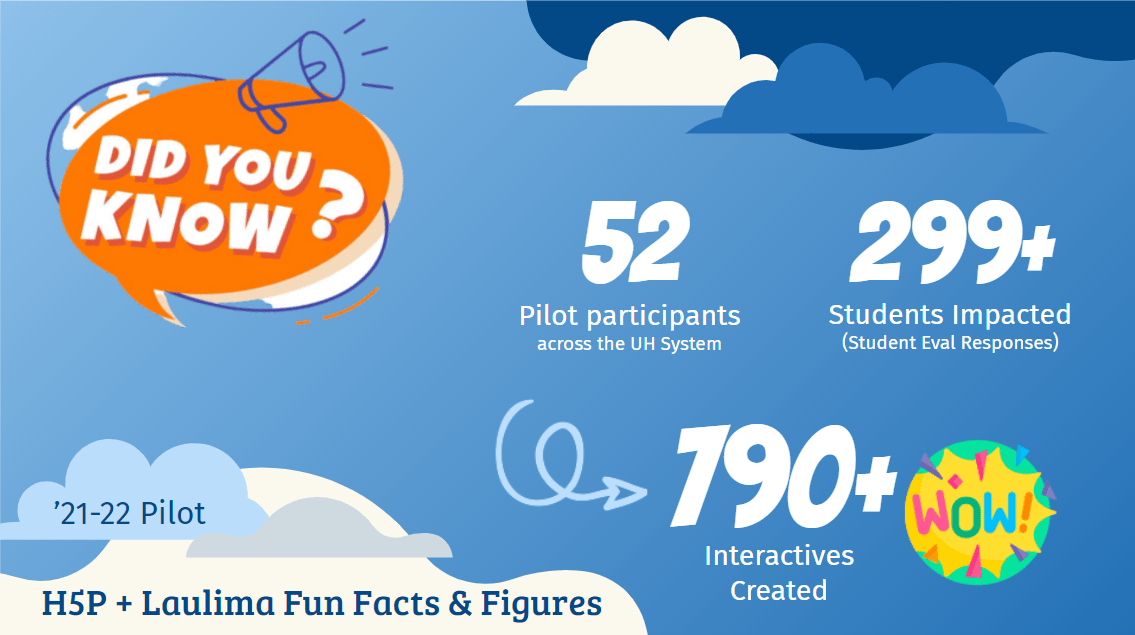
Congratulations 2021 – 2022 Leeward CC faculty who have participated.
- Darci Francis
- Jiajia Garcia
- Tracie Losch
- Danielle Mizuta
- Janet Wang-Lee
- William (Bill) Wright
Take a moment to view and interact with the H5p Interactives they’ve built and implemented (into fall ’21 and spring ’22 courses). View the complete UH System H5P + Laulima interatives library. Check out what the 2021-2022 H5P + Laulima cohort pilots accomplished.
Consider applying to be in the second cohort of participants this fall, 2022-2023 H5P + Laulima Cohort applications are now open! Deadline to apply is Friday, May 20, 2022. Applicants will be notified by mid-June.
Thoughts, questions, or feedback, please comment below. – Mahalo
Apple Pencil and Digital Paper Delivers
User Review of Apple iPad Pro with Apple Pencil
I have used several graphics tablets over the years, unsuccessfully. There was always something impractical about them. First, writing on a black plastic surface off to the side of the screen displaying the actual content is not intuitive and takes some hand-eye coordination. Second I’ve found that often the black plastic surface is a scaled down version of the display on which I was trying to write. The combination of the two traits often gives traditional graphics tablets a high learning curve for integration into a workflow and hinders adoption.
Why the iPad Pro with Apple Pencil?
Apple’s iOS ecosystem and iPad are significant players in the educational technology field. It therefore makes sense to start with a device that integrates with a large share of the educational technology market and established workflows to improve instructors integration and adoption. Specifically the iPad Pro 12.9″ (measured diagonally) provides a writable surface similar to a standard 8.5″ x 11″ sheet of paper. The Apple Pencil 2 is a precise and well designed stylus made to compliment the iPad. The stylus magnetically sticks to the side of the iPad and charges wirelessly. The tip of the stylus is durable and does not scratch the iPad’s screen. Writing on the iPad glass does take a little bit of practice. If that is of concern films are sold online to stick on the iPad screen to provide the resistance of writing on paper.
Advantages of Digital Note-taking?
I tested this package with the free Notability app which provides an intuitive way to leverage the benefits of iPad, iOS and Apple Pencil. Specifically there are numerous combinations of pen styles, stroke widths, and ink colors available. Notability allows for inserting pictures (new or from your photos), can concurrently record audio while note-taking, as well as export notes in multiple file types, email or Google Drive.
I’ve found the combination of iPad Pro and Apple Pencil to be stable and very usable, which increases the chance of it being used as a replacement to paper and pencil.
Pros:
- iPad/ iOS ecosystem
- iPad Pro 12.9″ (diagonal) writable surface is about 8.5″ x 11″
- Aim stylus directly at the image being displayed
- Precision stylus
- Ability to take and insert images into notes
- Share out notes to multiple file types and services
Cons:
- Cost
- Weight
Leeward Community College instructors interested in learning more can contact edtech@hawaii.edu to arrange a demo and schedule a trial today!
Thoughts, questions, or feedback, please comment below. – Mahalo
EMC Workshops on the Go (Microlearning Series)

About our EMC Workshops on the Go (Microlearning Series)
- Colleagues will receive an open invitation via email and registration button to announce the latest microlearning series.
- Simply register once for this workshop series by clicking the button and you will receive an email on Mondays and Tuesdays of the week featuring overview and link to view examples that support interaction and/ or student engagement.
- When you receive the email, take some time to review the contents. Give it a try, too, and use the resources for additional help. Reflect on how you can apply it in your classes. Jot down some ideas.
- Come to our optional Virtual Open Lab (Zoom sync session) on Thursdays at 1:00-2:00 p.m. to further engage in your learning by practicing what you learned with your peers, asking questions, getting ideas for your classes, etc.
- Example of microlearning series:
- Monday (date): Topic
- Tuesday (date): Topic 2
- Wednesday (date): Independent work time for hands-on exploration
- Thursday (date): Virtual Open Lab, live online office hours for sharing participants work, responding to questions and reflections.
- Example of microlearning series:
Thanks for taking the time to visit our EMC Blog. If you have thoughts, questions, or feedback, please comment below. – Mahalo
Let’s Engage with Remind.com
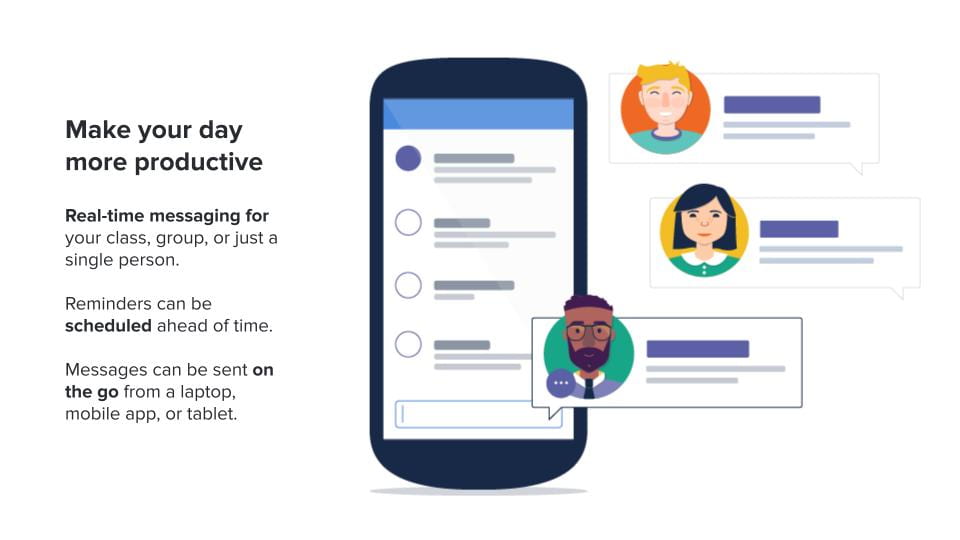
While email is a traditional way to send formal correspondence with each other there is a more engaging, on the go, way for educators and students to communicate with each other called Remind.com.
What is Remind.com?
Remind is a free service for educators to broadcast short timely announcements and updates to subscribed students via free Remind smartphone app (recommended) or traditional text message (without exchanging phone numbers). Alternatively Remind can also broadcast to subscribed email accounts and post broadcasted messages to a webpage archive. Remind was developed for educators, previously known as Remind101, their audience is K12 and their user policy seems respectful to users privacy, in addition Remind is an approved UH ITS Third Party Online tool. Lastly Remind works with your existing UH Google account by simple selecting to sign in with Google.
How does Remind.com work?
It starts with the course instructor creating a Remind Classroom and join link. The instructor then shares the join link with their students who would join the Remind class to receive messages.
Examples of using Remind.com for instruction would be for messaging course announcements or assignments reminders (Remind messages can be schedule to be delivered ahead of time). Another example is to use Remind as a student friendly way to receive questions from your students. Lastly, remind could support student communication within small group projects (eliminating the exchange of personal phone numbers or social media accounts) because Remind could allow for messaging between students in a small group directly within the Remind app.
Real World: Using Remind within instruction:
“I have used Remind for course announcements. Student are encouraged to sign up to receive messages, if they don’t I also embed the Remind message archive page within my Laulima course site.” Brent, ED 279
“I have also used Remind as an alternative way for students to ask me questions or seek clarification about course assignments. I also find students are able to snap pictures of their computer screen with their phones and easily include the images in their Remind message to support their questions” -Brent, ED 279
How will the Educational Media Center use Remind.com?
We’ll be using Remind.com to engage with participants as well as to delivery announcements and resources related to EMC Workshops on the Go professional development series.
Frequently Asked Questions:
General:
Q: Can students message each other through Remind App?
A: Instructors can enable or disable the ability for students to message each other (such as for small group work) in the Remind App. Students using the Remind App will always be able to message their instructor/ facilitator.
Text Messaging:
Q: Will phone numbers be shared with the instructor or other participants in Remind?
A: No, phone numbers will remain private and are held by Remind.com, they are not shared within your Remind community (including with your instructor/ facilitator)
Q: If I sign up to receive messages via text will I be charged?
A: If you phone plan does not include unlimited text messaging you should be aware that standard text messaging rates do apply (consider using the Remind App)
Q: Can I unsubscribe from receiving Remind text messages?
A: You can unsubscribe at any time by texting STOP or let us know and we can remove you.
Q: Can a student reply to a Remind text message from their instructor?
A: No, this is a one-way broadcast. You will not be able to text us. (consider using the Remind App, which does allow for 2 way messaging)
Thanks for taking the time to visit our EMC Blog. If you have thoughts, questions, or feedback, please comment below. – Mahalo