Skip to content
  • Blog Home
  • EMC Website

Educational Media Center

Leeward Community College

Tag: zoom

EMC, Zoom

Zoom Tutorial: Transcripts & Captioning for Video Recordings

Did you know you can add captions to your Zoom recordings? In accordance with the UH Guidelines for Accessible Technology and Digital Media, courses and course content should be accessibility compliant. One way to ensure your videos like your Zoom recording videos are accessibility compliant is to include captioning on them.

Recently, Zoom has included transcriptions for recorded meetings that can be downloaded through the cloud service. The UH Zoom Cloud Service is managed by UH ITS, and allows faculty and staff to save their recorded meetings to the cloud for download.

In the first Zoom tutorial video we will show you step-by-step instructions to request access to the UH Zoom Cloud Service (if you haven’t already), how to change your Zoom settings to enable transcriptions (one-time only step), and how to download files from the cloud service.

It is highly recommended to download the video recording and transcript files from the UH Zoom Cloud Service before uploading and embedding the video to Laulima. There are two options, you may upload your recording and captions to Google Drive. Or, you may upload your recording and captions to YouTube.
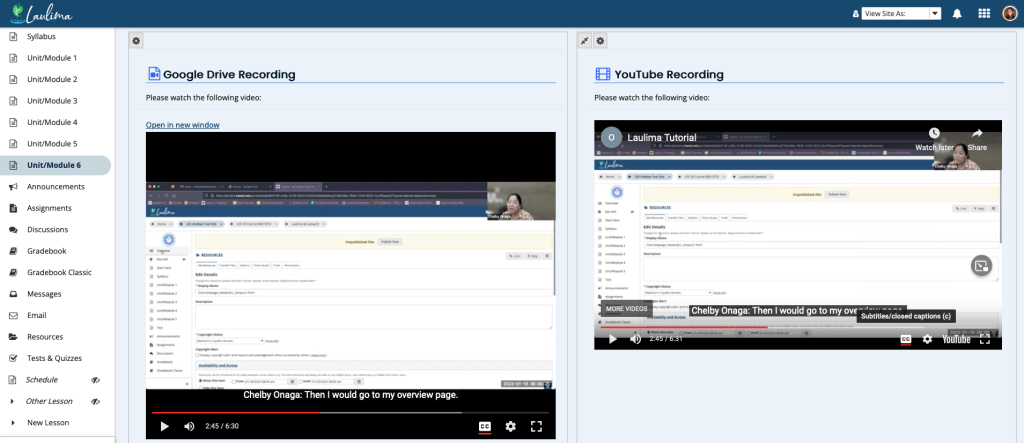
Screenshot of a Google Drive video and a YouTube video embedded in the Laulima Lessons tool.

In the second Zoom tutorial video, we will show you how to upload the video file (.mp4) and transcript file (.vtt) to Google Drive. Then, we will show you to embed the Google Drive video into Laulima Lessons.

In the third Zoom tutorial video, we will show you how to upload the file (.mp4) and transcript file (.vtt) to YouTube. Then, we will show you how to embed the YouTube video into Laulima Lessons.

You may also take a look at our full Zoom tutorial guide on transcripts and captioning for video recordings (via Google Docs).
February 24, 2023February 24, 2023by chelbyo
EMC

Earn a Badge of Completion for EMC Workshops on the Go: Zoom

EMC Workshops on the Go is a professional development series designed around a micro learning framework. The series provides focused learning of chunked content with reflection, hands-on exploration with a live learner support event. Instructional examples and resources were provided to introduce the tools and kick-start the ideation process to engage and promote active learning within  your teaching. Workshop activities consisted of online readings and video content, independent work time and optional synchronous question and answer session. Specifically for the past two weeks we were focused on the Zoom features of: Stamps, Polling, Breakout Rooms and Remote Control. Participants are encouraged to take the additional step to create and share an artifact that they’ve made to exemplify their proficiency in at least two of micro learning topics presented during this series. Upon verification of their submission and sharing of their artifact workshop participants will be eligible for a completion badge.

Learn more about the completion badge for EMC Workshops on the Go: Zoom

How to view my University of Hawai’i Badgr badges.

Banner

Thanks for taking the time to visit our EMC Blog. If you have thoughts, questions, or feedback, please comment below.  – Mahalo

December 7, 2021February 16, 2022by bhirata
EMC

EMC Workshops on the Go: Zoom Remote Control

Engaging with Zoom Remote Control

“It is literally true that you can succeed best and quickest by helping others to succeed.” — Napoleon Hill

Screen sharing can add a different dimension of interactivity between yourself and your participants. In a one-on-one meeting with a student, you could screen share an example in a program to help the student to visually understand what is being discussed. After going through the example with the student, you can give the student control of your screen so that they could practice another example with the file you already have out. The opposite can also be helpful if a student is sharing their screen with you regarding an error that’s occurring on their homework. You can request for remote control to briefly go over an example on their file that might be similar to the issue they are experiencing.

Zoom Remote Control can also be a great way to help students to give smoother transitions during team presentations. Check out the video below on how remote control can help your students while presenting in Zoom.

Haven’t used the remote control tool yet? View Zoom Support’s Requesting or giving remote control page to learn more about the remote control tool.

Try it out and think about creative ways you can utilize stamps into your Zoom sessions. Then, come to our optional Virtual Open Lab via Zoom on Thursday, December 9, 2021 at 1:00-2:00 p.m. to practice, ask questions, etc. You can also contact us (Educational Technologist) for help. Lastly, there will be an opportunity at the end of this 4-part microlearning series to earn a badge of achievement.


Thanks for taking the time to visit our EMC Blog. If you have thoughts, questions, or feedback, please comment below.  – Mahalo

December 7, 2021February 16, 2022by twjsakiy
EMC

EMC Workshops on the Go: Zoom Breakout Room

Engaging with Zoom Breakout Room

“I can do things you cannot, you can do things I cannot; together we can do great things.” – Mother Teresa

Breakout rooms are an easy way to create spaces for online collaboration. Collaboration can be anything from a small group activity, checking in with teams for a team project, or creating separate topic rooms that a participant can choose to join. When using breakout rooms, have you ever considered allowing your students to choose which room they would like to enter?

Allowing students to choose a preferred room for discussion helps to provide a level of confidence in a small group discussion. Check out the video below for ideas on implementing breakout rooms that allow students to choose the room they want to enter.

Haven’t created breakout rooms yet? View our Zoom breakout room button video and Zoom Support’s Managing Breakout Rooms page to learn more about Zoom breakout rooms.

Try it out and think about creative ways you can utilize breakout rooms into your Zoom sessions. Then, come to our optional Virtual Open Lab via Zoom on Thursday, December 9, 2021 at 1:00-2:00 p.m. to practice, ask questions, etc. You can also contact us (Educational Technologist) for help. Lastly, there will be an opportunity at the end of this 4-part microlearning series to earn a badge of achievement.


Thanks for taking the time to visit our EMC Blog. If you have thoughts, questions, or feedback, please comment below.  – Mahalo

December 6, 2021February 16, 2022by twjsakiy
EMC

EMC Workshops on the Go: Zoom Polling

Engaging with Zoom Polling

“People don’t care how much you know until they know how much you care” – Theodore Roosevelt

Connect, engage, and learn about your audience by polling them. When you invite them to actively participate in your presentation and seek their input they are more likely to get more out of your presentation.  Elevate your teaching with Zoom polling, you can pre-configure polling questions (step by step) or create polling questions on the fly (Polling icon in your session toolbar).  Consider the benefits of collecting individual student names or make your poll responses anonymous.  Lastly, you may decide to download your poll responses for later review. With pre-planning and little bit of practice, you can engage your audience with Zoom Polling.

Haven’t used the Zoom Polling feature yet? Learn more about Zoom Polling for Meetings to get started. We look forward to hearing about the creative ways to utilize Zoom Polling into your live sessions. Then, come to our optional Virtual Open Lab via Zoom on Thursday, December 2, 2021 at 1:00-2:00 p.m. to practice, ask questions, etc. You can also contact us (Educational Technologist) for help. Lastly, there will be an opportunity at the end of this 4-part microlearning series to earn a badge of achievement.


Thanks for taking the time to visit our EMC Blog. If you have thoughts, questions, or feedback, please comment below.  – Mahalo

November 30, 2021February 16, 2022by bhirata
EMC

EMC Workshops on the Go: Zoom Stamps

Engaging with Zoom Stamps

“You can’t use up creativity. The more you use, the more you have.” — Maya Angelou

Have you ever found yourself wondering how you can integrate short interactive questions in the middle of your lecture during a Zoom session like you would in a face-to-face class to engage your students? Perhaps you’re concerned about having to switch between Zoom tools or different windows? With the stamp annotation tool, you can include your interactive questions during a Zoom session without having to switch between windows. All you would need to do is to create your question slides ahead of time and insert them where you want them in your lecture slide deck. Then when you are screen sharing your slides and come upon the question slide during your live Zoom session, ask your students to utilize the Zoom stamps found in the Annotation tool under “View Options” to mark their answer virtually on your slide with the question.

It’s a great way to get everyone involved, especially students who may still be uncomfortable grabbing the mic or writing in the chat. Check out the video below for ideas on different types of questions you could implement in your Zoom session.

Haven’t used the stamp tool yet? View Zoom Support’s Annotation for Collaboration page and our quick notes for participants and instructors (which you can also share with your students) to learn more about the stamp tool.

Try it out and think about creative ways you can utilize stamps into your Zoom sessions. Then, come to our optional Virtual Open Lab via Zoom on Thursday, December 2, 2021 at 1:00-2:00 p.m. to practice, ask questions, etc. You can also contact us (Educational Technologist) for help. Lastly, there will be an opportunity at the end of this 4-part microlearning series to earn a badge of achievement.


Thanks for taking the time to visit our EMC Blog. If you have thoughts, questions, or feedback, please comment below.  – Mahalo

November 29, 2021February 16, 2022by twjsakiy
EMC

EMC Workshops on the Go

Join us for a new, microlearning workshop series featuring interactive activities using: Zoom.Zoom Stamp example

Zoom Polling example Zoom Breakout Rooms example

Our first microlearning series consists of four instructional examples using the tools in Zoom to support interaction and engage your students in your Zoom classrooms. These include:

  • Stamps
  • Polling
  • Breakout Rooms
  • Remote Control

How This Works

  1. Simply register once for this workshop series by clicking the button below and you will receive an email on Mondays and Tuesdays (see dates below) featuring examples of using Zoom to support interaction and engage your students.
    • Monday 11/29: Stamps
    • Tuesday 11/30: Polling
    • Monday 12/6: Breakout Rooms
    • Tuesday 12/7: Remote Control
  2. When you receive the email, take some time to review the contents. Give it a try, too, and use the resources for additional help. Reflect on how you can apply it in your classes. Jot down some ideas.
    Come to our optional Virtual Open Lab (Zoom sync session) on Thursdays at 1:00-2:00 p.m. to further engage in your learning by practicing what you learned with your peers, asking questions, getting ideas for your classes, etc.

    • Thursday 12/2: Stamps and Polling
    • Thursday 12/9: Breakout Rooms and Remote Control
  3. Furthermore, there will be an opportunity to earn a digital badge credential for this series by applying your learning. More details to come later for those who register.


Thanks for taking the time to visit our EMC Blog. If you have thoughts, questions, or feedback, please comment below.  – Mahalo

November 24, 2021February 16, 2022by rinake
EMC

November’s Latest Round-Up

Teach On, Power On Banner

In this newsletter, we’ll provide you a round-up of what’s new, what’s going away, and professional development opportunities.

  • UH Zoom Cloud Recording
  • Live Captioning and Transcription in UH Zoom
  • How to Upload and Share Recorded Videos
  • Technology Field Kits
  • Google Meet
  • Google Sites
  • Credly Digital Badging
  • EMC Workshop Recordings
  • EMC Upcoming Workshops (via Zoom)

[Read newsletter]

November 10, 2020November 10, 2020by rinake
EMC

Engage and Interact Live Online Using Zoom

Teach On, Power On Banner

Teaching remotely can present opportunities for creativity and to even enhance your face-to-face class. Pick up some ideas from the article below, “Remotely Hands-On.” Then, for more inspiration read and watch on for three ways you can use Zoom for engagement and interaction. From fun and simple to useful and interactive, we hope this sparks some ideas for you. [Read newsletter]

April 19, 2020April 26, 2020by rinake
EMC

Google Meet and Zoom Web Conferencing Tools and Tips

The main two UH supported web conferencing tools include UH Google Hangouts Meet and UH Zoom. Here are some helpful resources to help you explore both options.

Using Google Meet

In the video tutorial:

  • How to access Meet (0:44)
  • How to create a meeting (2:06)
  • Check your audio and video settings prior to joining (2:33)
  • Copy join link to share with your students (5:29)
  • Meet interface (6:01)
  • Present entire screen or window (8:40)
  • People list of who’s in your session (9:32)
  • Text chat (10:23)
  • Record meeting (11:03)
  • Recording file saved to My Drive > Meet Recordings (12:47)
  • Change share settings of the video file so students can view recording (13:28)

Google Meet Help Center

Tips

  • Create a separate Meet session for each class.
  • Create one Meet session for a Virtual Office.
  • Send your students instructions on how to join the Meet session and include them in your Laulima course sites. Use our template to copy/paste the Meet instructions from on page 1. [Virtual Classroom instructions] [Virtual Office instructions]
  • Create multiple Meet sessions to use as breakout rooms and then assign groups of students to each Meet session.

Using Zoom

  • Getting Started with Zoom
  • Recording a Meeting or Lecture with Zoom
  • Screen Sharing a Powerpoint and Video Simultaneously

Zoom Help Center Tutorials

UH Zoom Blog – latest news and information

Tips

  • Zoom Tips – FERPA, breakout rooms, polling, and more

Video and Web Conferencing Tips

  • Synchronous Meetings or Lecture: Web Conference Tips for Remote Instruction
  • Lights, Camera, Sound, Action
  • Online Netiquette and Privacy
  • Dos and don’ts of online meetings
April 7, 2020June 15, 2020by rinake

Posts pagination

1 2

Search

Recent Posts

  • Designing for Quality: How the Lamakū Course Starter PLC Has Evolved
  • Adventures in Canva Teams 
  • Lamakū – Intelligent Agents
  • Leeward Lamakū Weekly Tips (Fall 2025)
  • Capturing “My Monumental Summer”: Behind the Scenes With the EMC Video Production Unit

Categories

Recent Comments

  • rinake on Cross-Listed Courses in Laulima
  • Merissa Bunton, Ed. D. on Cross-Listed Courses in Laulima
  • bhirata on An Instructor Preview of Leeward Online Learning Orientation for Students

Archives

Accessibility

UH Accessibility Statement

Proudly powered by WordPress | Theme: Sin by vsFish.
Skip to toolbar
  • About WordPress
    • Get Involved
    • About Edublogs
    • Learn WordPress
    • Edublogs.org
    • Documentation
    • Contact
  • Log In