Skip to content
  • Blog Home
  • EMC Website

Educational Media Center

Leeward Community College

Tag: Laulima

EMC, Zoom

Zoom Tutorial: Transcripts & Captioning for Video Recordings

Did you know you can add captions to your Zoom recordings? In accordance with the UH Guidelines for Accessible Technology and Digital Media, courses and course content should be accessibility compliant. One way to ensure your videos like your Zoom recording videos are accessibility compliant is to include captioning on them.

Recently, Zoom has included transcriptions for recorded meetings that can be downloaded through the cloud service. The UH Zoom Cloud Service is managed by UH ITS, and allows faculty and staff to save their recorded meetings to the cloud for download.

In the first Zoom tutorial video we will show you step-by-step instructions to request access to the UH Zoom Cloud Service (if you haven’t already), how to change your Zoom settings to enable transcriptions (one-time only step), and how to download files from the cloud service.

It is highly recommended to download the video recording and transcript files from the UH Zoom Cloud Service before uploading and embedding the video to Laulima. There are two options, you may upload your recording and captions to Google Drive. Or, you may upload your recording and captions to YouTube.

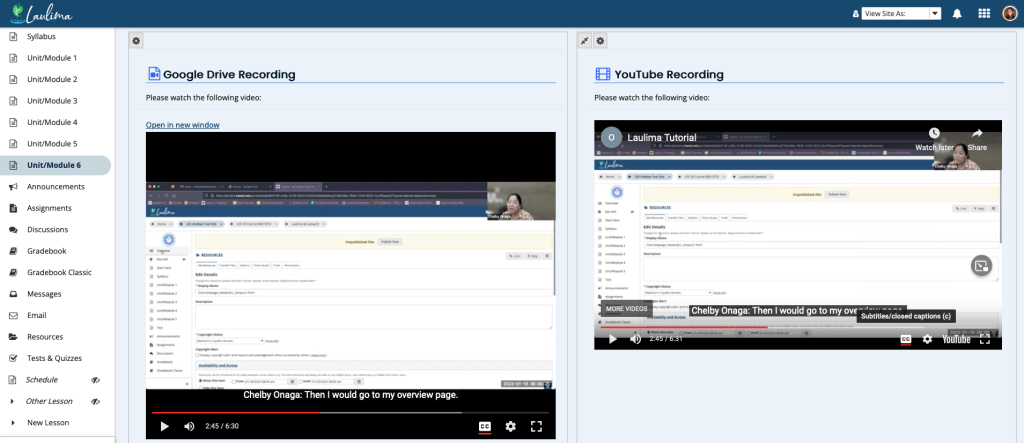
Screenshot of a Google Drive video and a YouTube video embedded in the Laulima Lessons tool.

In the second Zoom tutorial video, we will show you how to upload the video file (.mp4) and transcript file (.vtt) to Google Drive. Then, we will show you to embed the Google Drive video into Laulima Lessons.

In the third Zoom tutorial video, we will show you how to upload the file (.mp4) and transcript file (.vtt) to YouTube. Then, we will show you how to embed the YouTube video into Laulima Lessons.

You may also take a look at our full Zoom tutorial guide on transcripts and captioning for video recordings (via Google Docs).

February 24, 2023February 24, 2023by chelbyo
Ed Tech, EMC

Updating the Laulima Overview Tool

For those of you using a UH Laulima template, after the most recent Laulima update, you no longer need to update the overview.html page in Resources to update your Overview tool/page in your Laulima course site. There is a one-time step you’ll need to do to put that overview page content directly in the Overview tool which will then allow you to edit directly in the Overview tool using the text editor. You will continue to edit/update using the Overview tool’s text editor even when you import the Overview tool into your next semester’s Laulima site. Follow these instructions and/or watch this video tutorial (6:00) to show you how.

8/23/23 Update: You’ll also need to update any images you have on your Overview page because that image is private to that particular course site. Either upload the image to your course site’s Resources tool and re-insert it on your Overview page. Or, and recommended, upload it to your Home site Resources tool, change the settings to public, and in your course site, re-insert that image on your Overview page. Doing it the latter way will allow you to import to next semester’s site without having to update the image file.

February 2, 2023August 23, 2023by chelbyo
EMC

Laulima Upgrade v21

During the 2022 winter break, ITS Laulima Support upgraded to v21. You may notice some interface changes as well as a few new features.

Quick Highlights

Some highlights in v21 include:

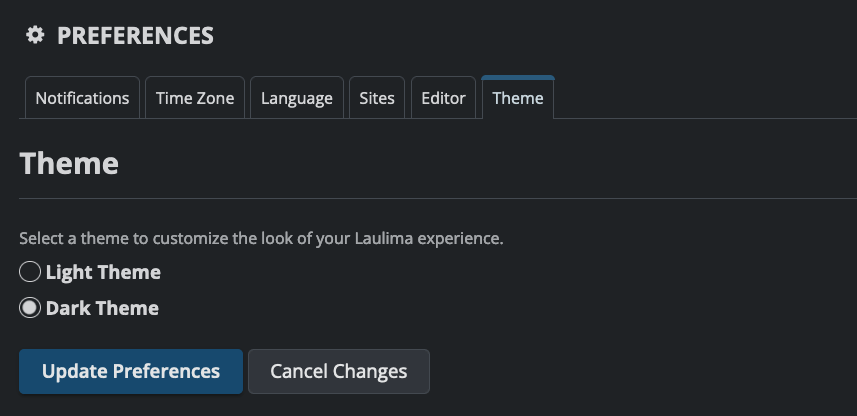
  • Dark Theme mode:

Screenshot of the Preferences Theme menu in Dark theme mode

  • Dashboard (New Tool):
    • Add Widgets
    • Select a Layout
  • Assignments:
    • External Tool (LTI) – submit assignments that use outside publishing or vendor platforms that are integrated into Laulima such as IDAP, Cenage Tools, or H5P + Laulima
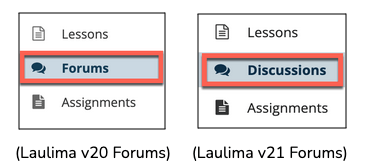
  • Forums (Renamed to “Discussions”):

Screenshot of Forums tool renamed as Discussions tool in Laulima v21

  • Gradebook:
    • Message Students – directly message students from the Gradebook tool regarding a particular gradebook item.
    • Import/Export tab
  • Lessons:
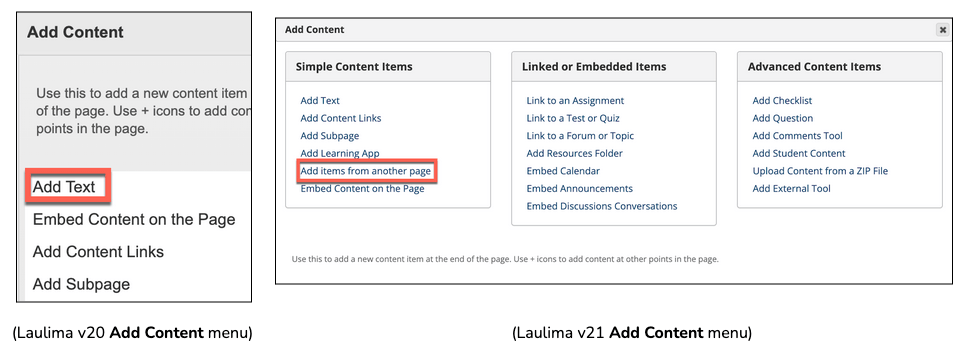
    • Add Content menu

Screenshot of v20 Add content menu and v21 Add content menu in Laulima

    • Add Layout from Template
    • Reorder screen
  • Rubrics:
    • Search function
    • Weighted Criteria

More Information

For a complete list and information of all new features and changes in Laulima v21, please see the faculty resource document.

Additionally, there will be a Laulima v21 Upgrade and Tips for Instruction webinar hosted by the UH Instructional Design Professional Learning Community (PLC) this Friday, January 6th, from 10:00AM – 11:30AM. Please consider registering to attend.

January 3, 2023January 3, 2023by chelbyo
Uncategorized

Cross-Listed Courses in Laulima

Do you combine multiple sections of a course in Laulima? Please note that due to FERPA concerns raised by the UH Data Governance Office, ITS has revised their request process for cross-listing or combining Laulima sites. You will find new guidance language on the Laulima site request page that reflects how faculty could request to combine their courses while still being FERPA compliant.

Here’re the highlights relevant to you for Fall 2022:

Dissemination mode vs. Collaboration mode: this distinction was necessary to ensure that students are fully aware (and have an option to withdraw) before the start of the semester if there is cross-CRN collaboration.

  • Combined sites in Dissemination mode are used for disseminating announcements and providing course content only: (a) Don’t use the Email tool since it shows names and email addresses of students in all CRNs, in violation of FERPA. (b) Discussion/Forum groups cannot be formed across CRNs.

  • Combined sites in Collaboration mode can use the Email tool and other collaborative activities (such as discussions/forums) across CRNs, but need to include in the syllabus, “This course space is being shared by students in the following CRNs [list] and if you do not wish to be in a shared course space, please drop this section and register for another section of this course.”

  • Submit your request to combine sites by August 18, 2022, if you plan to use the collaboration mode.

Note that in future semesters, you will need to submit a request before the registration begins if your combined sites will operate in the collaboration mode.

June 22, 2022July 5, 2022by rinake
EMC

The Ins and Outs with Laulima Forums, Rubrics, and Gradebook Integration

One reason you may have for using the new Gradebook tool in Laulima is its ability to pair with the new Rubrics tool. (Note: Laulima Rubrics can only be paired with the new Gradebook tool and not the Gradebook Classic tool.) Furthermore, the Rubrics tool integrates with other tools such as Assignments, Tests & Quizzes, and Forums, allowing you to provide transparency and feedback to students about how they are graded.

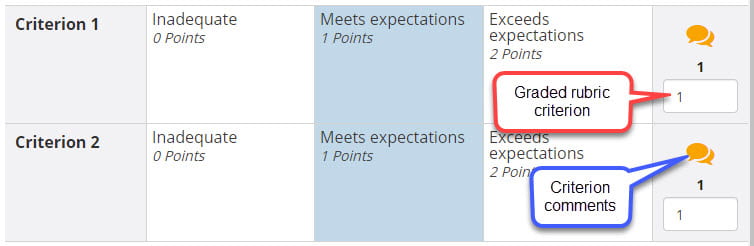
However, we would like to share about an issue regarding using a rubric (Laulima Rubrics) associated with a forum topic (Laulima Forums) and the Gradebook tool. When you are grading via Forums using an associated rubric, the graded rubric criterion (i.e. individual score for each criterion) and criterion comments (i.e. individual comments for each criterion) you may input do not transfer to the Gradebook (although the overall grade and general comments do). Thus, students are unable to see how they are graded for each criterion and any criterion comments you make using the rubric.

Graded rubric criterion and criterion comments

We have come up with a suggestion to circumvent this issue until the developers can provide a permanent solution. The purpose behind this suggestion is to still provide students with a visible rubric using the Rubrics tool when accessing the forum activity in the Forums tool.

First, add the Forums and Gradebook tools if you don’t already have them added to your Laulima course site. Importantly, hide the Rubrics tool from student’s view under Site Info > Tool Order. (We discovered a bug that sometimes allows students have the ability to edit unlocked rubrics.)

Second, associate the rubric in both the Forums and Gradebook tools.

  1. Create the rubric in the Rubrics tool.
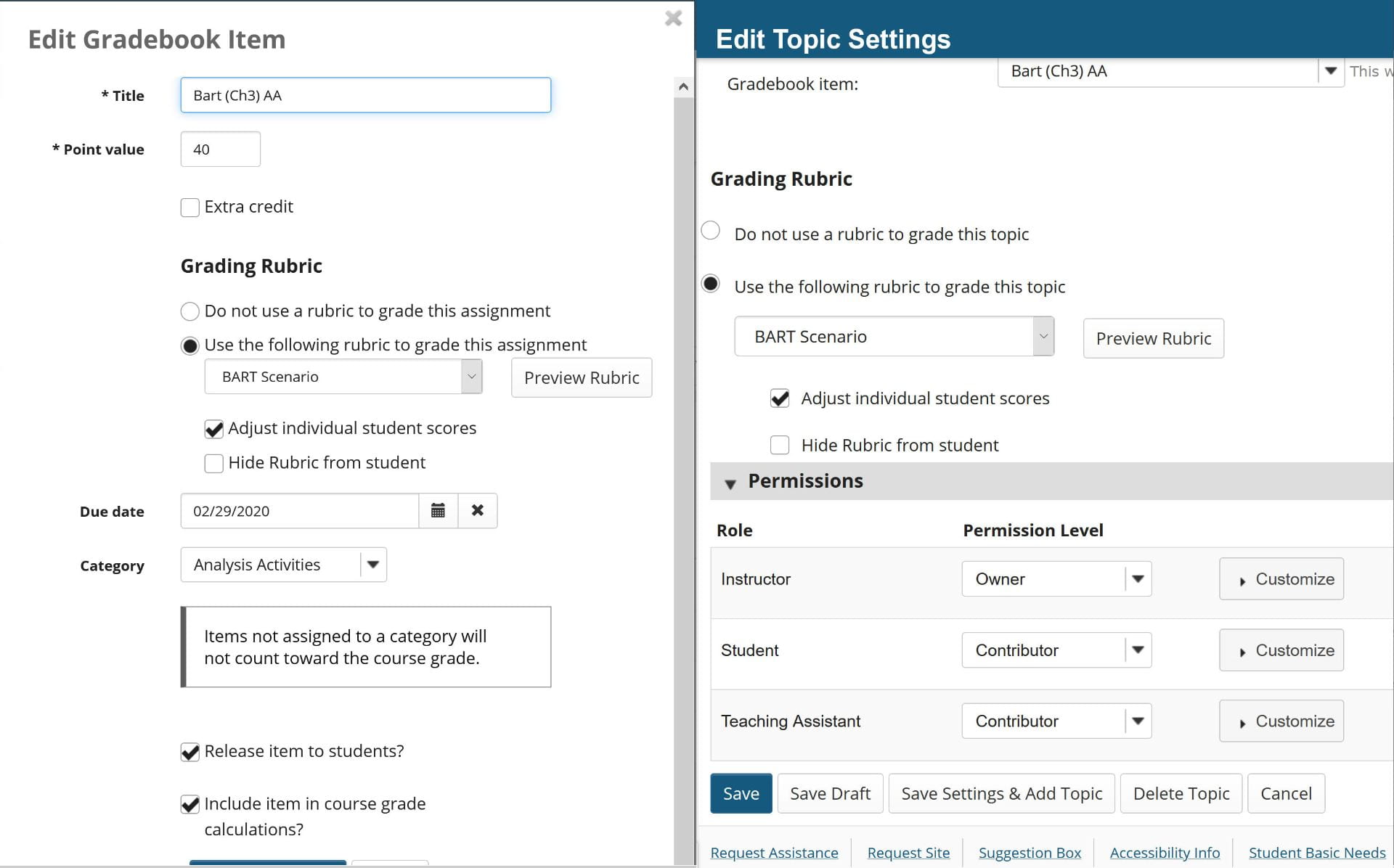
  2. Add a new gradebook item in the Gradebook tool and associate it to the rubric. (See screenshot below, left.)
  3. Associate the forum activity in the Forums tool to the Gradebook item in the forum topic settings. This will then allow you to associate it to the rubric. (See screenshot below, right.)

Edit Gradebook item to associate rubric. Edit topic settings of Forum to associate to Gradebook item and rubric.

Third, when you grade the forum activity using the rubric, grade via the rubric you associated with the Gradebook tool and not the Forums tool if you are providing a score for each criterion and/or criterion comments. (Remember, grading using the rubric via the Forums tool will not transfer the graded rubric criterion and criterion comments you make to the Gradebook tool. Only the total score and general comments transfer.)

Unfortunately, grading forum posts via the Gradebook tool may create a disconnected experience for you as the instructor, so we recommend opening two windows when grading – one for Forums and the other for Gradebook. This way you can read the students’ posts via Forums in one window as you grade and provide comments in the associated rubric via the Gradebook in the second window.

Note: UH ITS has been made aware of this issue so it may get fixed in the near future.


View Laulima New Gradebook Laulima New Gradebook: Transparency, Consistency, Efficiency session recording.

March 30, 2021February 16, 2022by twjsakiy
EMC

Fall 2020 End-of-the-Semester Reminders & Tips

Teach On, Power On Banner

Aloha! The Educational Media Center (EMC) rounded up some tips and reminders to help you as you wrap up the semester.

  • Publish Grades using Laulima Gradebook
  • Delete Synchronous Recordings
  • Educational Technology Tools Survey
  • Coming in Spring 2021

[Read newsletter]


December 20, 2020by rinake
EMC

Spring Grades and Summer Plans for Fall 2020

Teach On, Power On Banner

One last push as we head into finals weeks and grading. We are almost through the semester! In case you missed our workshops last week, we’ve got you covered. Also, we are working hard to provide a professional development series this summer to help you prepare for Fall semester. Don’t miss out on this opportunity; you CanDO it!

[Read newsletter]

May 11, 2020December 14, 2021by rinake
EMC

What’s My Grade? Using Laulima Gradebook

As the semester winds down and much student learning has taken place, there is a common question being asked, what’s my grade? The answer should not come as surprise because a final grade is comprised of many smaller grades earned throughout the semester. Having an organized and well maintained gradebook communicates that much need feedback to your students. During a semester “grades” factor into decisions like to whether a student chooses to drop or withdraw from a class and instructors may look at grades to help identify students who need additional outreach and support. Maintaining an up to date and accurate gradebook is also a item on the Leeward CC DE Guidelines for sound course design (Leeward DE Guidelines 5.6). We recently held a webinar on this subject and are able to share the presentation, “What’s My Grade? Laulima Gradebook (12:48).”

Laulima Gradebook tutorial

Lastly, here are some summary points to remember:

Dashes don’t equal zeros.

As we approach the end of the semester, missed scores for Gradebook Items should be converted to zeros to provide the most accurate calculated grade to the student. There is a button in Course Grades (scroll to bottom of that page) to convert all dashes in your Gradebook to “0”s. (Best practice tip: Throughout the semester as assignments are graded, put in zeros for those who did not submit their assignments so students can see their actual course grade at any point during the semester since dashes do not count against their course grade.)

Three steps to successfully publishing (final grades).

  1. Use the Publish tab to submit final course grades from Laulima Gradebook to MyUH Banner.
  2. Identify the last date of attendance for students who have not passed your course.
  3. Log into MyUH Final Grades. For students who have not passed the course input date of last attendance and submit grades.

If you are in doubt on your successful submission you can email LeeCC campus Registrar, Grant Helgeson (helgeson@hawaii.edu). Include: Subject & Course Number CRN (e.g. ENG 100, CRN: 12345)


Thoughts, questions, or feedback, please comment below.  – Mahalo

May 6, 2020April 25, 2022by bhirata
Uncategorized

Laulima Forums: Profile Photo and Statistics & Grading

New in Laulima Forums – profile photo and grading and statistics!

Profile Photo

Forums now has the ability for everyone to show their profile photo next to the posts you authored. To add your photo, go to Laulima > My Workspace > Profile and upload your photo there. This adds a personal touch to online synchronous discussions when you can see the person’s photo of who you’re conversing with.

Statistics & Grading

The Statistics & Grading feature allows the instructor to see activity statistics such as how many posts a student authored and read. (Although, I’m not too sure how accurate the “read”/”unread” statistic is since you have to manually click the “Mark all as read” button when you open a thread to mark it as “read”.) With this feature, you can view statistics for each student/user or by topic. It also makes grading easier because there’s a link to input the grade right there, too, that’s connected to the Gradebook tool. (Note: You must add a gradebook item for your discussions in the Gradebook tool before you’re able to input grades from the Forums tool.)

Click here to learn more (complete with screenshots) and check it out in your Laulima sites!

January 11, 2017December 16, 2021by rinake
EMC

Mahalo for spending your Convocation Week with us

It was so nice to see everyone back from summer break during Convocation Week!

The EMCers hit the ground running before the semester started by offering several opportunities and professional development events during Convocation Week. Many digital badges were awarded to participants who participated and accomplished the events’/workshops’ objectives (perfect for including as evidence in contract renewal / tenure / promotion dossiers). Here’s a quick re-cap of what happened.

Tech It Out Day

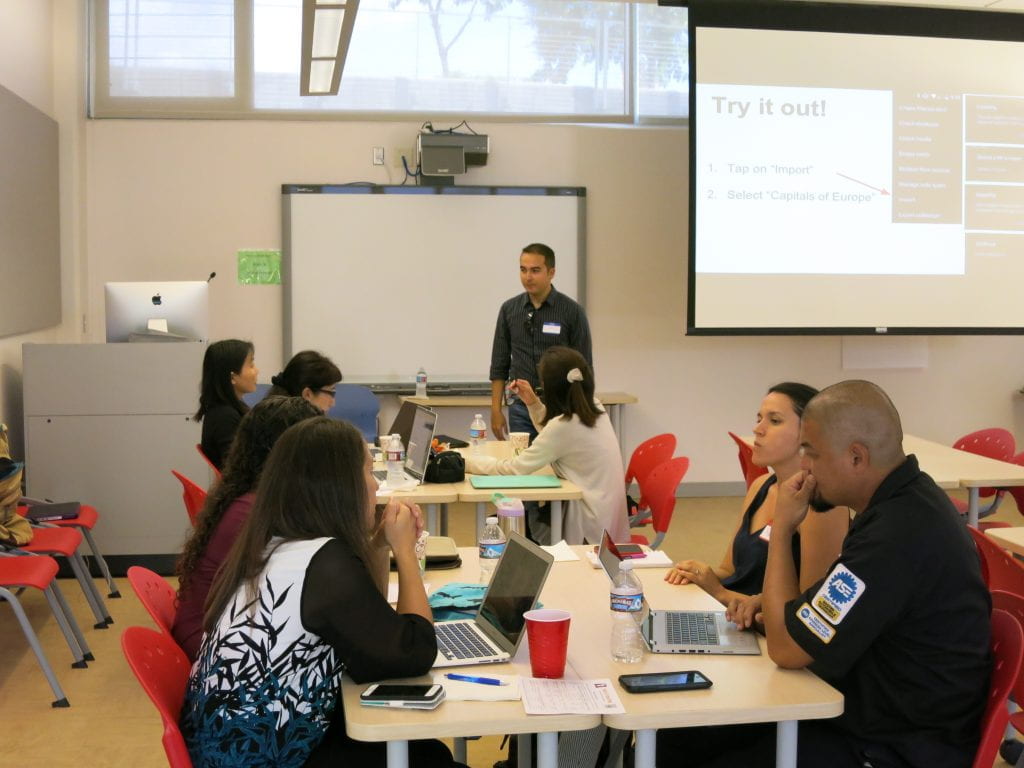
We enjoyed another great Tech It Out Day at Leeward CC on Tuesday, August 16, 2016. Tech It Out Day is an event to explore how technology can enhance teaching and learning in the classroom and online where participants can “test drive” a variety of technology tools, network with peers, and celebrate the start of a new semester.

Tech It Out Day session photo

This year, we were fortunate to have some faculty facilitate sessions by sharing how they use technology in their classes and leading folks through getting started with using the technology tools that they shared. A participant said, “Thank you for the short but very useful sessions! I learned a lot without feeling like the workshops went on for too long! Also, these workshops are so helpful, I can definitely use them in classes.” Another participant commented, “Thank you for engaging sessions. They got right to the point and provided immediately useful information and other resources.” Facilitators and participants earned Tech It Out Day 2016 badges for their involvement and participation.

Now that you got to see and try a few new things, if you would like further help using what you learned or tried, feel free to contact us. We’d love to help you take it to the next step.
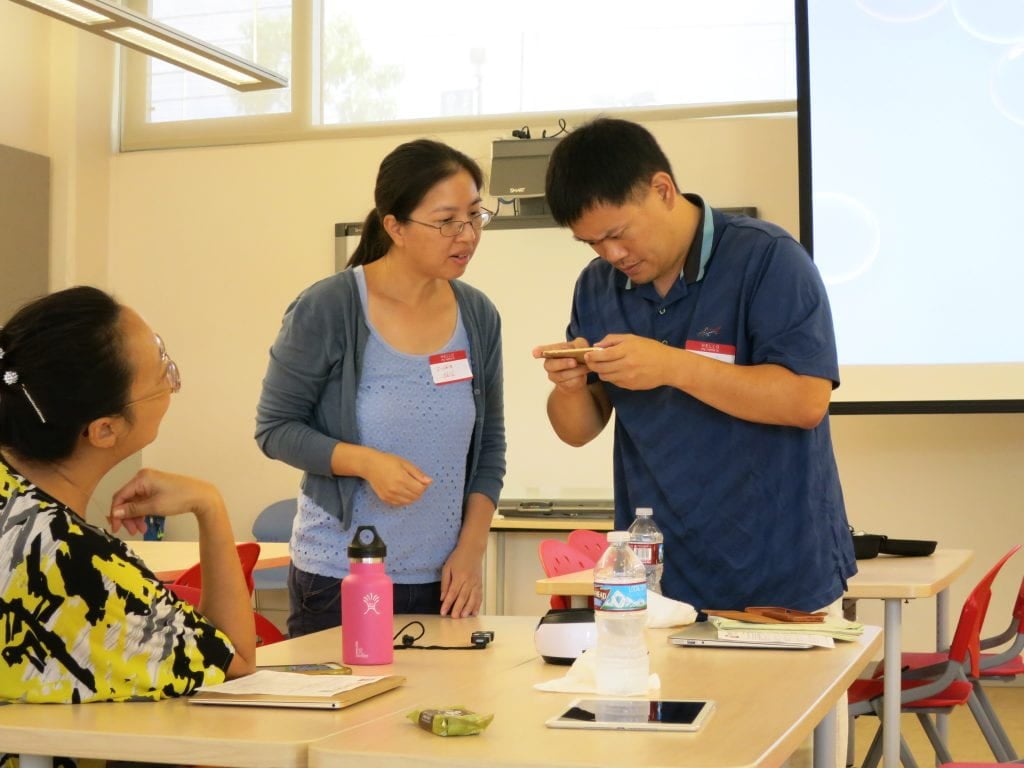
Tech It Out Day faculty looking at swivl

For more photos, check out our Tech It Out Day 2016 album.

Laulima Challenge

Following Tech It Out Day on Tuesday, we had a full house at the Laulima Challenge workshop, facilitated by Greg Walker, Brent Hirata, and me. Everyone was super engaged and learned how to set up the basic tools in Laulima by working together in pairs to do several tasks in Laulima to complete the Laulima Challenge activity. At completion, they earned the “Laulima Challenge Finisher” badge.
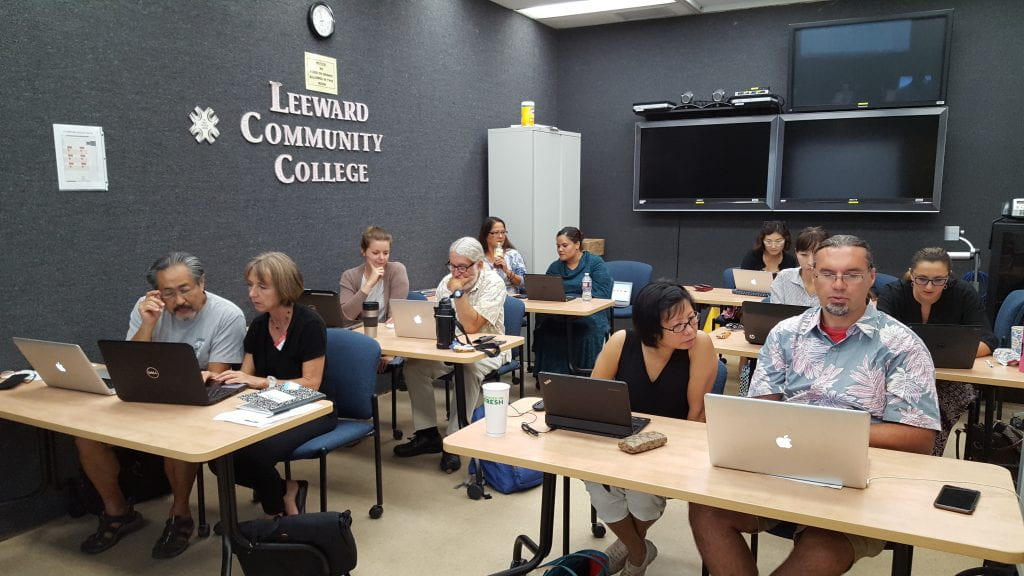
Smart Classroom Challenge

On Wednesday, August 17, 2016, Brent Hirata facilitated two Smart Classroom Challenge workshops where instructors had the opportunity to learn about, troubleshoot, and try out the Smart Classroom technologies. Reef Amano, Electronics Technician at the EMC, was also there to lend a hand answering technical questions about the hardware. Participants appreciated the opportunity to access a typical Smart Classroom as well as the newer Smart Classroom in the Education Building. By completing the Smart Classroom challenge activity, participants earned the “Smart Classroom Challenge Finisher” badge.

Syllabus Makeover Challenge

On Thursday, August 18, 2016, I facilitated the Syllabus Makeover Challenge workshop. We had guest instructor, Michele Mahi, start things off by sharing her visual syllabus. Then, we discussed various syllabus activities and how we can create more value of it for the students through creativity and design, created a basic doc with the textual contents for a syllabus, and then transformed it into a dynamic, purposeful, and visual syllabus. A free Google Slides template was shared and participants learned different ways to share their syllabus with their students. A collection of instructors’ syllabi can be found here. Participants were excited to bring new life into their syllabus and many finished creating their visual syllabi after the workshop. Once they implement and share how things went, they can earn the “Visual Syllabus Creator” badge.

Self-Introduction Video

Convocation week was also an opportunity for folks to record a self-introduction video. A self-introduction video is great to help students get to know you, about the course or service you provide, and establish a connection with you. Visit our growing collection of self-introduction videos by Leeward CC faculty and staff.

See You Around!

We enjoyed our time with you and hope to see you around, work with you, and see you in our upcoming workshops/events this semester. If you haven’t attended our Convocation Week events this semester, we hope that you do next semester!

Upcoming Events

Don’t miss out! Register now for:
  • Gmail Challenge on Tuesday, August 31, 2016 at 1:30-3:00 PM
  • Google Docs Challenge on Tuesday, September 6, 2016 at 1:30-3:00 PM
August 24, 2016December 16, 2021by rinake

Posts pagination

1 2

Search

Recent Posts

  • Designing for Quality: How the Lamakū Course Starter PLC Has Evolved
  • Adventures in Canva Teams 
  • Lamakū – Intelligent Agents
  • Leeward Lamakū Weekly Tips (Fall 2025)
  • Capturing “My Monumental Summer”: Behind the Scenes With the EMC Video Production Unit

Categories

Recent Comments

  • rinake on Cross-Listed Courses in Laulima
  • Merissa Bunton, Ed. D. on Cross-Listed Courses in Laulima
  • bhirata on An Instructor Preview of Leeward Online Learning Orientation for Students

Archives

Accessibility

UH Accessibility Statement

Proudly powered by WordPress | Theme: Sin by vsFish.
Skip to toolbar
  • About WordPress
    • Get Involved
    • About Edublogs
    • Learn WordPress
    • Edublogs.org
    • Documentation
    • Contact
  • Log In